Note
Currently, the documentation for static class members is missing due to a potential pybind11 bug.
This affects the predefined colors, e.g. Color.Magenta, but also the
special members, i.e. Color.Invalid and Color.Same.
Usage of these special members is documented in the docstrings of the drawing
functions (of the Painter), wherever they are supported.
Defining Colors
A color in rgba format, i.e. \(r,g,b,a \in [0,1]\). |
|
Returns a default color for the \(x\), \(y\), or \(z\) axis. |
|
Alias of |
|
Alias of |
|
Returns a list of the predefined color names. |
|
Color transition function for |
|
Color transition function for |
|
Color transition function for |
|
Alias of |
|
Creates a |
|
Creates a |
Color Class
Color definitions are handled via the Color class
in rgba format, where \(r, g, b, a \in [0, 1]\).
- class viren2d.Color
A color in rgba format, i.e. \(r,g,b,a \in [0,1]\).
Corresponding C++ API:
viren2d::Color.Important
If you initialize a color from a
(r,g,b,a)tuple, you must ensure that \(r,g,b,a \in [0, 1]\).This is due to the saturation cast performed by
Color. For example, the followingtuplewill be converted to(1, 1, 1), i.e. the polygon would be actually filled with white!>>> # Mistakenly specifying a color as `RGB` tuple instead of `rgb`: >>> painter.draw_polygon(..., fill_color=(20, 20, 75))
To specify a color as RGB, use
RGBa()instead:>>> # Correctly specifying a color as `RGB`: >>> painter.draw_polygon(..., fill_color=viren2d.RGBa(20, 20, 75))
Attributes:
Opacity \(\in [0, 1]\), where 0 is fully transparent and 1 is fully opaque.
Blue component \(\in [0, 1]\).
Green component \(\in [0, 1]\).
Red component \(\in [0, 1]\).
Methods:
Operator
lhs + rhs.Checks for equality.
Operator
+=.Operator
*= float.Overloaded function.
Operator
-=.Operator
/= float.Operator
Color * float.Checks for inequality.
Operator
float * Color.Colorinstances can be pickled.Operator
lhs - rhs.Operator
Color / float.Returns a deep copy.
Creates a
Colorfrom its HSV representation.Returns a color for the given category name.
Returns a color for the (numeric) object ID.
Returns the grayscale intensity as \(l = 0.2989*r + 0.5870*g + 0.1141*b\).
Returns the inverse/complementary color.
Checks if the r,g,b values are almost equal, i.e. within \(\pm \epsilon\).
Returns
Trueif this is a valid rgba color, where all components are \(\in [0, 1]\).Returns a list of the category names which are explicitly known to
from_object_category().Returns the corresponding \((R, G, B)\) tuple.
Returns the corresponding \((R, G, B, \alpha)\) tuple.
Returns the grayscale representation of this color.
Returns the hex code representation.
Returns the corresponding
(h, s, v)tuple.Returns the corresponding
(r, g, b)tuple.Returns the corresponding
(r, g, b, a)tuple.Returns a color with the same \(r,g,b\) components, but the given \(\alpha\).
- Black = viren2d.Color(red=0, green=0, blue=0, alpha=1)
- Blue = viren2d.Color(red=0, green=0, blue=1, alpha=1)
- Cyan = viren2d.Color(red=0, green=1, blue=1, alpha=1)
- Green = viren2d.Color(red=0, green=1, blue=0, alpha=1)
- Invalid = viren2d.Color.Invalid
- Magenta = viren2d.Color(red=1, green=0, blue=1, alpha=1)
- Red = viren2d.Color(red=1, green=0, blue=0, alpha=1)
- Same = viren2d.Color.Same
- White = viren2d.Color(red=1, green=1, blue=1, alpha=1)
- Yellow = viren2d.Color(red=1, green=1, blue=0, alpha=1)
- __add__(self: viren2d.Color, rhs: viren2d.Color) viren2d.Color
Operator
lhs + rhs.Adds the rgba values of the two
Colorinstances (lhsandrhs) and performs a saturating cast, i.e. the resulting rgba values will be clamped to[0, 1].
- __eq__(self: viren2d.Color, other: viren2d.Color) bool
Checks for equality.
Returns
Trueif all components are equal.
- __getstate__(self: viren2d.Color) tuple
- __iadd__(self: viren2d.Color, other: viren2d.Color) viren2d.Color
Operator
+=.Adds the other
Colorrgba values and performs a saturation cast, i.e. the resulting rgba values will be clamped to[0, 1].
- __imul__(self: viren2d.Color, scale: float) viren2d.Color
Operator
*= float.Scales all components by the given scalar factor and performs a saturating cast, i.e. the resulting rgba values will be clamped to
[0, 1].
- __init__(*args, **kwargs)
Overloaded function.
__init__(self: viren2d.Color) -> None
Initializes an invalid color.
An invalid color, i.e.
r,g,b < 0, can be used in severalPaintermethods to mark special color handling, e.g. to skip filling of a shape.This constructor additionally allows the implicit conversion of
Noneto an invalid color.__init__(self: viren2d.Color, arg0: None) -> None
A
Nonewill be interpreted as an invalid color.An invalid color, i.e.
r,g,b < 0, can be used in severalPaintermethods to mark special color handling, e.g. to skip filling.__init__(self: viren2d.Color, tpl: tuple) -> None
Initializes the color from a r,g,b or r,g,b,a
tuple.Each value must be a floating point number within
[0, 1]. The alpha value will be set to 1 if not provided.- Example:
>>> painter.draw_polygon(..., fill_color = (red, green, blue))
>>> painter.draw_polygon(..., fill_color = (red, green, blue, alpha)
__init__(self: viren2d.Color, red: float, green: float, blue: float, alpha: float = 1.0) -> None
Initializes the color from the given rgba components.
All values will be clamped to
[0, 1].__init__(self: viren2d.Color, colorspec: str, alpha: float = 1.0) -> None
Initializes the color from a string representation (hexcode or color name).
- Hexcode:
HTML hex code string as either
#RRGGBBor#RRGGBBAA:>>> painter.draw_rect(..., fill_color = '#00ff00') >>> painter.draw_rect(..., fill_color = '#a0b0c0f0')
- Color name:
See
color_names()for a list of available color names.>>> painter.draw_rect(..., fill_color = 'black') >>> painter.draw_rect(..., fill_color = 'navy-blue')
A color name can also include an
alphasuffix, which must be specified as integer in[0, 100]):>>> painter.draw_rect(..., fill_color = 'forest-green!50')
Color names can also be inverted by prepending either
!or-, which results in the complementary color, e.g.!blue!30is the same asyellow!30:>>> painter.draw_rect(..., fill_color = '!blue!30)
- __isub__(self: viren2d.Color, other: viren2d.Color) viren2d.Color
Operator
-=.Subtracts the other
Colorrgba values and performs a saturating cast, i.e. the resulting rgba values will be clamped to[0, 1].
- __itruediv__(self: viren2d.Color, rhs: float) viren2d.Color
Operator
/= float.Divides all components of this
Colorby the right-hand side scalar factor and performs a saturating cast, i.e. the resulting rgba values will be clamped to[0, 1].
- __mul__(self: viren2d.Color, rhs: float) viren2d.Color
Operator
Color * float.Scales all components of the left-hand side
Colorby the right-hand side scalar factor and performs a saturating cast, i.e. the resulting rgba values will be clamped to[0, 1].
- __ne__(self: viren2d.Color, other: viren2d.Color) bool
Checks for inequality.
Returns
Trueif any components differ.
- __rmul__(self: viren2d.Color, lhs: float) viren2d.Color
Operator
float * Color.Scales all components of the right-hand side
Colorby the left-hand side scalar factor and performs a saturating cast, i.e. the resulting rgba values will be clamped to[0, 1].
- __setstate__(self: viren2d.Color, arg0: tuple) None
Colorinstances can be pickled.
- __sub__(self: viren2d.Color, rhs: viren2d.Color) viren2d.Color
Operator
lhs - rhs.Subtracts the rgba values of the
Colorinstancerhsfromlhsand performs a saturating cast, i.e. the resulting rgba values will be clamped to[0, 1].
- __truediv__(self: viren2d.Color, rhs: float) viren2d.Color
Operator
Color / float.Divides all components of the lef-hand side
Colorby the right-hand side scalar factor and performs a saturating cast, i.e. the resulting rgba values will be clamped to[0, 1].
- property alpha
Opacity \(\in [0, 1]\), where 0 is fully transparent and 1 is fully opaque.
Corresponding C++ API:
viren2d::Color::alpha.- Type:
- property blue
Blue component \(\in [0, 1]\).
Corresponding C++ API:
viren2d::Color::blue.- Type:
- copy(self: viren2d.Color) viren2d.Color
Returns a deep copy.
Corresponding C++ API: Copy constructor of
viren2d::Color.
- static from_hsv(h: float, s: float, v: float, alpha: float = 1.0) viren2d.Color
Creates a
Colorfrom its HSV representation.- Parameters:
h – Hue, \(h \in [0, 360]\).
s – Saturation, \(s \in [0, 1]\).
v – Value, \(v \in [0, 1]\).
alpha – Optional opacity of the color, \(\alpha \in [0, 1]\).
Corresponding C++ API:
viren2d::ColorFromHSV.
- static from_object_category(category: str, colormap: viren2d.ColorMap = viren2d.ColorMap('glasbey-dark')) viren2d.Color
Returns a color for the given category name.
Allows coloring the same object class consistently, e.g. to distinguish multiple classes, such as
carorperson.Corresponding C++ API:
viren2d::Color::FromObjectCategory.- Parameters:
category – The category name as
str. Seeobject_category_names()for a list of category names which are explicitly defined. For any other category name, a string hash will be computed, which is then used to lookup a corresponding color.colormap – Optionally, select a different categorical
ColorMap. This parameter can be specified both via the enumeration value and the color map’s string representation.
Currently, the following category names are available. The shown colors are from the default color map:
airplane apple background backpack banana baseball-bat baseball-glove bear bed bench bicycle bird boat book bottle bowl broccoli bus cake car carrot cat cell-phone chair clock couch cow cup dining-table dog donut elephant fire-hydrant fork frisbee giraffe hair-drier handbag horse hot-dog human keyboard kite knife laptop microwave motorcycle mouse orange oven parking-meter pedestrian person pizza potted-plant refrigerator remote sandwich scissors sheep sink skateboard skis smartphone snowboard spoon sports-ball stop-sign suitcase surfboard teddy-bear tennis-racket tie toaster toilet toothbrush traffic-light train truck tv umbrella vase vehicle wine-glass zebra
- static from_object_id(id: int, colormap: viren2d.ColorMap = viren2d.ColorMap('glasbey-dark')) viren2d.Color
Returns a color for the (numeric) object ID.
Allows coloring the same object instance consistently, e.g. when tracking objects.
Corresponding C++ API:
viren2d::Color::FromObjectId.- Parameters:
With the default color map, these are the colors for the first 42 object IDs:
0 1 2 3 4 5 6 7 8 9 10 11 12 13 14 15 16 17 18 19 20 21 22 23 24 25 26 27 28 29 30 31 32 33 34 35 36 37 38 39 40 41
- property green
Green component \(\in [0, 1]\).
Corresponding C++ API:
viren2d::Color::green.- Type:
- intensity(self: viren2d.Color) float
Returns the grayscale intensity as \(l = 0.2989*r + 0.5870*g + 0.1141*b\).
Corresponding C++ API:
viren2d::Color::GrayscaleIntensity.
- inverse(self: viren2d.Color) viren2d.Color
Returns the inverse/complementary color.
Except for shades of gray, this returns \((1 - r, 1 - g, 1 - b, a)\). For gray values, it will either return black or white. In any case, the returned alpha value will stay the same.
- Why special handling of gray?
Complementary colors should be used to provide good contrast/highlights. For colors close to medium gray (where r,g,b are close to 0.5), the rgb inverse would not be too useful.
Corresponding C++ API:
viren2d::Color::Inverse.
- is_shade_of_gray(self: viren2d.Color, eps: float = 0.02) bool
Checks if the r,g,b values are almost equal, i.e. within \(\pm \epsilon\).
Corresponding C++ API:
viren2d::Color::IsShadeOfGray.
- is_valid(self: viren2d.Color) bool
Returns
Trueif this is a valid rgba color, where all components are \(\in [0, 1]\).Corresponding C++ API:
viren2d::Color::IsValid.
- static object_category_names() List[str]
Returns a list of the category names which are explicitly known to
from_object_category().Corresponding C++ API:
viren2d::Color::ListObjectCategories.This category list contains all (80+1) COCO classes (incl.
background), plus additional aliases, e.g.human\(\leftrightarrow\)person, orvehicle\(\leftrightarrow\)car.Currently, the following category names are available. The shown colors are from the default color map used in
from_object_category():airplane apple background backpack banana baseball-bat baseball-glove bear bed bench bicycle bird boat book bottle bowl broccoli bus cake car carrot cat cell-phone chair clock couch cow cup dining-table dog donut elephant fire-hydrant fork frisbee giraffe hair-drier handbag horse hot-dog human keyboard kite knife laptop microwave motorcycle mouse orange oven parking-meter pedestrian person pizza potted-plant refrigerator remote sandwich scissors sheep sink skateboard skis smartphone snowboard spoon sports-ball stop-sign suitcase surfboard teddy-bear tennis-racket tie toaster toilet toothbrush traffic-light train truck tv umbrella vase vehicle wine-glass zebra
- to_RGB(self: viren2d.Color) Tuple[int, int, int]
Returns the corresponding \((R, G, B)\) tuple.
Each element \(R, G, B \in [0, 255]\) will be of type
int.Corresponding C++ API:
viren2d::Color::ToRGB.
- to_RGBa(self: viren2d.Color) Tuple[int, int, int, float]
Returns the corresponding \((R, G, B, \alpha)\) tuple.
The color components will be of type
int, with \(R, G, B \in [0, 255]\), whereas \(\alpha \in [0, 1]\) is of typefloat.Corresponding C++ API:
viren2d::Color::ToRGBa.
- to_gray(self: viren2d.Color) viren2d.Color
Returns the grayscale representation of this color.
The \(r,g,b\) components of the returned color will be set to the luminance, \(l = 0.2989*r + 0.5870*g + 0.1141*b\), and \(\alpha\) will stay the same.
Corresponding C++ API:
viren2d::Color::ToGray.
- to_hex(self: viren2d.Color, with_alpha: bool = False) str
Returns the hex code representation.
If
with_alphaisTrue, the returned string representation will contain 8 digits (+ 1 character for the leading#), and 6 digits otherwise. To compute the hexadecimal representation, each component, i.e. r,g,b and optionally a, is first scaled to[0, 255].Corresponding C++ API:
viren2d::Color::ToHexString.- Parameters:
with_alpha – Boolean flag whether to include the alpha value or not.
- to_hsv(self: viren2d.Color) Tuple[float, float, float]
Returns the corresponding
(h, s, v)tuple.Each tuple element will be of type
float, with \(h \in [0, 360]\), \(s \in [0, 1]\) and \(v \in [0, 1]\).Corresponding C++ API:
viren2d::Color::ToHSV.
- to_rgb(self: viren2d.Color) tuple
Returns the corresponding
(r, g, b)tuple.Each tuple element will be of type
float, with \(r,g,b \in [0, 1]\).No corresponding C++ API, access red, green, blue separately.
- to_rgba(self: viren2d.Color) tuple
Returns the corresponding
(r, g, b, a)tuple.Each tuple element will be of type
float, with \(r,g,b,a \in [0, 1]\).No corresponding C++ API, access red, green, blue and alpha separately.
- with_alpha(self: viren2d.Color, alpha: float) viren2d.Color
Returns a color with the same \(r,g,b\) components, but the given \(\alpha\).
Corresponding C++ API:
viren2d::Color::WithAlpha.- Parameters:
alpha – Opacity as
float\(\in [0, 1]\).
Color Names
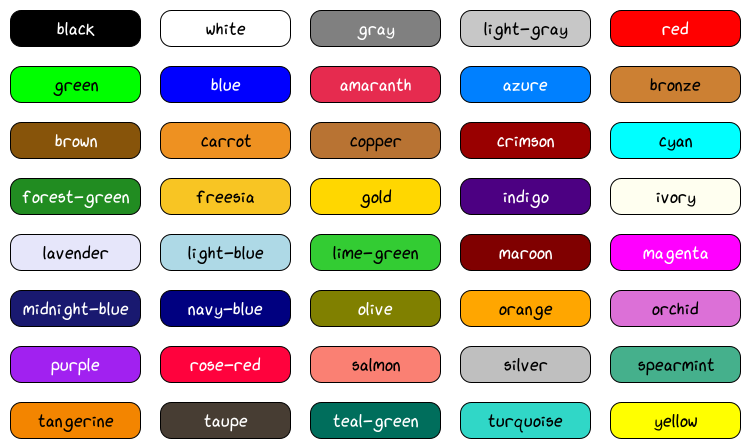
There are several predefined colors which can be initialized via their name string:
- viren2d.color_names() List[str]
Returns a list of the predefined color names.
Each of these names can be used to initialize a
Color. For example:>>> text_style.color = 'midnight-blue' # alpha = 1.0 >>> line_style.color = 'forest-green!40' # alpha = 0.4
Corresponding C++ API:
viren2d::ListNamedColors.Currently, the following color names are available:
Name
Hex code
RGB
rgb
black
#000000 (0, 0, 0) (0.00, 0.00, 0.00) white
#ffffff (255, 255, 255) (1.00, 1.00, 1.00) gray
#7f7f7f (127, 127, 127) (0.50, 0.50, 0.50) light-gray
#c6c6c6 (198, 198, 198) (0.78, 0.78, 0.78) red
#ff0000 (255, 0, 0) (1.00, 0.00, 0.00) green
#00ff00 (0, 255, 0) (0.00, 1.00, 0.00) blue
#0000ff (0, 0, 255) (0.00, 0.00, 1.00) amaranth
#e52b4f (229, 43, 79) (0.90, 0.17, 0.31) azure
#007fff (0, 127, 255) (0.00, 0.50, 1.00) bronze
#cc7f33 (204, 127, 51) (0.80, 0.50, 0.20) brown
#87540a (135, 84, 10) (0.53, 0.33, 0.04) carrot
#ed9121 (237, 145, 33) (0.93, 0.57, 0.13) copper
#b77233 (183, 114, 51) (0.72, 0.45, 0.20) crimson
#990000 (153, 0, 0) (0.60, 0.00, 0.00) cyan
#00ffff (0, 255, 255) (0.00, 1.00, 1.00) forest-green
#218c21 (33, 140, 33) (0.13, 0.55, 0.13) freesia
#f7c423 (247, 196, 35) (0.97, 0.77, 0.14) gold
#ffd600 (255, 214, 0) (1.00, 0.84, 0.00) indigo
#4c0082 (76, 0, 130) (0.30, 0.00, 0.51) ivory
#ffffef (255, 255, 239) (1.00, 1.00, 0.94) lavender
#e5e5f9 (229, 229, 249) (0.90, 0.90, 0.98) light-blue
#add8e5 (173, 216, 229) (0.68, 0.85, 0.90) lime-green
#33cc33 (51, 204, 51) (0.20, 0.80, 0.20) maroon
#7f0000 (127, 0, 0) (0.50, 0.00, 0.00) magenta
#ff00ff (255, 0, 255) (1.00, 0.00, 1.00) midnight-blue
#191970 (25, 25, 112) (0.10, 0.10, 0.44) navy-blue
#00007f (0, 0, 127) (0.00, 0.00, 0.50) olive
#7f7f00 (127, 127, 0) (0.50, 0.50, 0.00) orange
#ffa500 (255, 165, 0) (1.00, 0.65, 0.00) orchid
#db70d6 (219, 112, 214) (0.86, 0.44, 0.84) purple
#a021ef (160, 33, 239) (0.63, 0.13, 0.94) rose-red
#ff023d (255, 2, 61) (1.00, 0.01, 0.24) salmon
#f97f72 (249, 127, 114) (0.98, 0.50, 0.45) silver
#bfbfbf (191, 191, 191) (0.75, 0.75, 0.75) spearmint
#44af8c (68, 175, 140) (0.27, 0.69, 0.55) tangerine
#f28400 (242, 132, 0) (0.95, 0.52, 0.00) taupe
#473d33 (71, 61, 51) (0.28, 0.24, 0.20) teal-green
#006d5b (0, 109, 91) (0.00, 0.43, 0.36) turquoise
#30d6c6 (48, 214, 198) (0.19, 0.84, 0.78) yellow
#ffff00 (255, 255, 0) (1.00, 1.00, 0.00)
Color Name Cheat Sheet:
Color Utilitites
- viren2d.axis_color(axis: object) viren2d.Color
Returns a default color for the \(x\), \(y\), or \(z\) axis.
Can be used, for example, to visualize the origin/orientation of the world coordinate system via differently colored arrows.
Current axis colors: \(x\), \(y\), and \(z\)
Corresponding C++ API:
viren2d::Color::CoordinateAxisColor.- Parameters:
axis – Either the character code of the axis (
'x','y', or'z'), or its zero-based index asint.
- viren2d.color_from_object_category(category: str, colormap: viren2d.ColorMap = viren2d.ColorMap('glasbey-dark')) viren2d.Color
Alias of
viren2d.Color.from_object_category().
- viren2d.color_from_object_id(id: int, colormap: viren2d.ColorMap = viren2d.ColorMap('glasbey-dark')) viren2d.Color
Alias of
viren2d.Color.from_object_id().
- viren2d.fade_out_linear(value: float) float
Color transition function for
viren2d.Painter.draw_trajectory().Can be used to compute the color mixing weight for the color transition of fading trajectories.
Corresponding C++ API:
viren2d::ColorFadeOutLinear.- Returns:
The input value, i.e. \(y = \text{value}\).
- Return type:
- viren2d.fade_out_logarithmic(value: float) float
Color transition function for
viren2d.Painter.draw_trajectory().Can be used to compute the color mixing weight for the color transition of fading trajectories.
Corresponding C++ API:
viren2d::ColorFadeOutLogarithmic.- Returns:
The logarithmic factor \(y=\operatorname{log}_{10}(0.9 * \text{value} + 1)\).
- Return type:
- viren2d.fade_out_quadratic(value: float) float
Color transition function for
viren2d.Painter.draw_trajectory().Can be used to compute the color mixing weight for the color transition of fading trajectories.
Corresponding C++ API:
viren2d::ColorFadeOutQuadratic.- Returns:
The quadratic factor \(y = \text{value}^2\).
- Return type:
- viren2d.object_category_names() List[str]
Alias of
viren2d.Color.object_category_names().