Drawing with the Painter
- class viren2d.Painter
A Painter lets you draw on its canvas.
Typical workflow:
Create a painter with an empty canvas:
>>> import viren2d
>>> painter = viren2d.Painter()
Initialize its canvas:
Paint an empty canvas with a given color via
set_canvas_rgb()Set up the canvas from image data via
set_canvas_image()Set up the canvas by loading an image from disk via
set_canvas_filename()
Note that the overloaded Painter constructors allow combining these steps:
>>> # Set up from image data, e.g. `numpy.ndarray`:
>>> image = np.zeros((600, 800, 3), dtype=np.uint8)
>>> painter = viren2d.Painter(image)
>>>
>>> # Or create a custom, blue canvas:
>>> painter = viren2d.Painter(
>>>     width=1920, height=1080, color=(0.0, 0.0, 0.8))
Draw onto the canvas via the painter’s
draw_xxx(...)methods, for example:>>> painter.draw_arrow(...) >>> painter.draw_bounding_box_2d(...)
After all objects have been drawn, retrieve the visualization via
get_canvas(). For example, to get a deeply copied image asnumpy.ndarray:>>> import numpy as np >>> canvas = painter.get_canvas(copy=True) >>> img_np = np.array(canvas, copy=False)
Alternatively, if access via properties is preferred, a shared memory image buffer can also be via its
canvasattribute. To obtain a deeply copied image as before, we can leverage thenumpy.ndarrayconstructor:>>> img_np = np.array(painter.canvas, copy=True)
Either continue drawing (step 3) or set up a new canvas (step 2), i.e. it is safe to reuse the same painter instance.
Methods:
Overloaded function.
Draws a circular arc.
Draws an arrow.
Draws a single 2D bounding box.
Draws a circle.
Draws an ellipse.
Draws a color gradient.
Draws a grid.
Draws the estimated line of horizon.
Draws an image onto the canvas.
Draws a line.
Draws a single marker/keypoint.
Draws multiple (similarly styled) markers/keypoints.
Draws a polygon.
Draws a rectangle.
Draws single- or multi-line text.
Draws a single- or multi-line text box.
Draws multiple (similarly styled) trajectories.
Draws a single trajectory.
Visualizes a coordinate system reference frame.
Returns the current visualization in RGBA format.
Returns the size of the canvas in pixels.
Checks if the canvas has been set up correctly.
Resets the latest clip region.
Saves the current visualization to disk.
Initializes the canvas from the given image file.
Initializes the canvas from the given image.
Initializes the canvas with the given color.
Establishes a circular clip region for the current canvas.
Establishes a rectangular clip region for the current canvas.
Attributes:
Provides a shared memory view on the painter's canvas for convenience.
Height in pixels of the painter's canvas (read-only).
Width in pixels of the painter's canvas (read-only).
- __init__(*args, **kwargs)
Overloaded function.
__init__(self: viren2d.Painter) -> None
Default constructor.
Initializes an empty canvas, i.e.
is_valid()will returnFalseuntil the canvas has been properly set up viaset_canvas_image(), etc.__init__(self: viren2d.Painter, image: object) -> None
Creates a painter and initializes its canvas from an image.
Initializes the painter’s canvas with the given image. See
set_canvas_image()for supported image formats and parameter types.__init__(self: viren2d.Painter, height: int, width: int, color: viren2d.Color = viren2d.Color(red=1, green=1, blue=1, alpha=1)) -> None
Creates a painter with a customized canvas.
Initializes the painter’s canvas and fills it with the given
Color.
- property canvas
Provides a shared memory view on the painter’s canvas for convenience.
See
get_canvas()for details about the image format of the canvas. Can be used to convert the current visualization into anumpy.ndarrayvia:>>> img_np = np.array(painter.canvas, copy=True)
Although this property is read-only (you cannot assign a newly allocated memory), it could still be used to change the individual pixels of the canvas (as these are not write-protected):
>>> img_np = np.array(painter.canvas, copy=False)
>>> img_np[:, :, :3] = 0  # Now, the canvas is black
Corresponding C++ API:
viren2d::Painter::GetCanvas.- Type:
- draw_arc(self: viren2d.Painter, center: viren2d.Vec2d, radius: float, angle_from: float, angle_to: float, line_style: viren2d.LineStyle = <LineStyle(2.0px, #007fff, solid)>, include_center: bool = True, fill_color: viren2d.Color = viren2d.Color.Invalid) bool
Draws a circular arc.
Corresponding C++ API:
viren2d::Painter::DrawArc.- Parameters:
center – Center position as
Vec2d.radius – Radius of the arc in pixels as
float.angle_from – The arc will be drawn from
angle_fromtoangle_toin clockwise direction. Both angles are specified in degrees asfloat, where 0 degrees points in the direction of increasing \(x\) coordinates.angle_to – See
angle_from.line_style –
A
LineStylespecifying how to draw the arc’s outline.If you pass
LineStyle.Invalid, the contour will not be drawn - then, you must provide a validfill_color.include_center – If
True(default), the center point will be included when drawing the outline and filling.fill_color – If you provide a valid
Color, the arc will be filled.
- Returns:
Trueif drawing completed successfully. Otherwise, check the log messages. Drawing errors are most likely caused by invalid inputs.
Example
>>> line_style = viren2d.LineStyle(
>>>     width=5, color='maroon',
>>>     dash_pattern=[], dash_offset=0.0,
>>>     cap='round', join='miter')
>>> painter.draw_arc(
>>>     center=(50, 50), radius=20, angle_from=30, angle_to=330,
>>>     line_style=line_style, include_center=True,
>>>     fill_color='same!30')
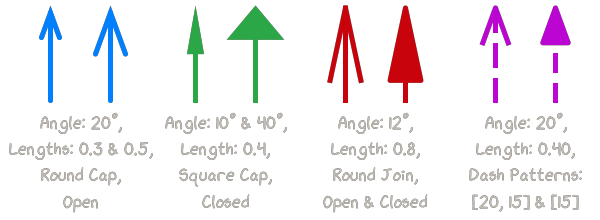
- draw_arrow(self: viren2d.Painter, pt1: viren2d.Vec2d, pt2: viren2d.Vec2d, arrow_style: viren2d.ArrowStyle = <ArrowStyle(lw=2.0, tip=0.2, angle=20.0°, open, #007fff, solid)>) bool
Draws an arrow.
Corresponding C++ API:
viren2d::Painter::DrawArrow.- Parameters:
pt1 – Start of the arrow shaft as
Vec2d.pt2 – End of the arrow shaft (i.e. the pointy end) as
Vec2d.arrow_style – An
ArrowStylespecifying how to draw the arrow.
- Returns:
Trueif drawing completed successfully. Otherwise, check the log messages. Drawing errors are most likely caused by invalid inputs.
Example
>>> arrow_style = viren2d.ArrowStyle(
>>>     width=3, color='black',
>>>     tip_length=0.3, tip_angle=20,
>>>     tip_closed=True, double_headed=False,
>>>     dash_pattern=[], dash_offset=0.0,
>>>     cap='round', join='miter')
>>> painter.draw_arrow(
>>>     pt1=(10, 10), pt2=(42, 42), arrow_style=arrow_style)
Note
Arrows should always be drawn fully opaque. Otherwise, you’ll experience visible blending in the crossing path segments (i.e. at the tip).
- draw_bounding_box_2d(self: viren2d.Painter, rect: viren2d.Rect, box_style: viren2d.BoundingBox2DStyle = <BoundingBox2DStyle(LineStyle(2.0px, #007fff, solid), TextStyle("monospace", 16px, ls=1.2, left, top, #000000), box fill=Color::Same(a=0.10), text fill=Color::Same(a=0.50), clipped)>, label_top: List[str] = [], label_bottom: List[str] = [], label_left: List[str] = [], left_t2b: bool = False, label_right: List[str] = [], right_t2b: bool = True) bool
Draws a single 2D bounding box.
Corresponding C++ API:
viren2d::Painter::DrawBoundingBox2D.- Parameters:
rect – The box as
Rect.box_style – A
BoundingBox2DStylespecifying how to draw this bounding box.label_top – Label text to display at the top of the bounding box, given as
listofstr(supporting multi-line labels).label_bottom – Label text to display at the bottom edge.
label_left – Label text to display along the left edge.
left_t2b – If
True, the label text will be oriented from top-to-bottom.label_right – Label text to display along the right edge.
right_t2b – If
True, the label text will be oriented from top-to-bottom.
- Returns:
Trueif drawing completed successfully. Otherwise, check the log messages. Drawing errors are most likely caused by invalid inputs.
Example
>>> line_style = viren2d.LineStyle(
>>>   width=7, color='navy-blue',
>>>   dash_pattern=[], dash_offset=0.0,
>>>   cap='round', join='miter')
>>> text_style = viren2d.TextStyle(
>>>   family='monospace', size=18,
>>>   color='navy-blue', bold=True,
>>>   italic=False, line_spacing=1.1,
>>>   halign='center', valign='top')
>>> box_style = viren2d.BoundingBox2DStyle(
>>>   line_style=line_style, text_style=text_style,
>>>   box_fill_color='same!20', text_fill_color='white!60',
>>>   clip_label=True)
>>> painter.draw_bounding_box_2d(
>>>   rect=viren2d.Rect.from_ltwh(20, 42, 200, 400, radius=0.2),
>>>   box_style=box_style,
>>>   label_top=['Multi-Line Label', '(... at the top)'],
>>>   label_bottom=['Bottom Edge'], label_left=['Left Edge'],
>>>   left_t2b=True, label_right=[], right_t2b=False)
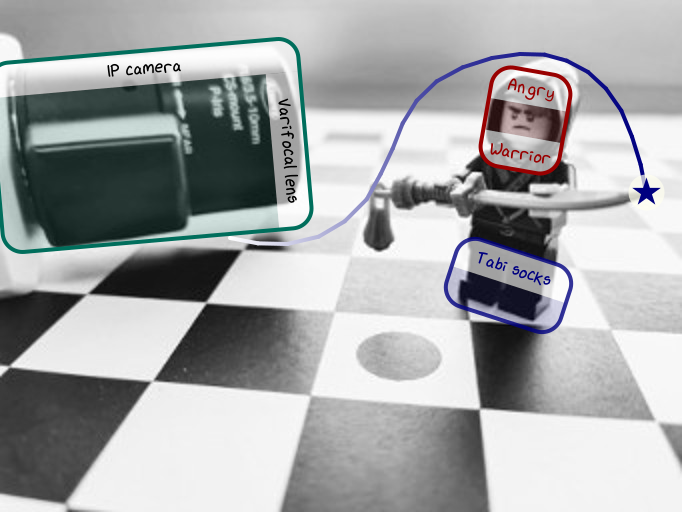
The code listing to create this visualization is shown in the RTD tutorial section on tracking-by-detection.
- draw_circle(self: viren2d.Painter, center: viren2d.Vec2d, radius: float, line_style: viren2d.LineStyle = <LineStyle(2.0px, #007fff, solid)>, fill_color: viren2d.Color = viren2d.Color.Invalid) bool
Draws a circle.
Corresponding C++ API:
viren2d::Painter::DrawCircle.- Parameters:
center – Center position as
Vec2d.radius – Radius of the circle in pixels as
float.line_style –
A
LineStylespecifying how to draw the circle’s outline.If you pass
LineStyle.Invalid, the contour will not be drawn - then, you must provide a validfill_color.fill_color – If you provide a valid
Color, the circle will be filled.
- Returns:
Trueif drawing completed successfully. Otherwise, check the log messages. Drawing errors are most likely caused by invalid inputs.
Example
>>> line_style = viren2d.LineStyle(
>>>     width=5, color='maroon',
>>>     dash_pattern=[], dash_offset=0.0,
>>>     cap='round', join='miter')
>>> painter.draw_circle(
>>>     center=(50, 50), radius=30,
>>>     line_style=line_style, fill_color='same!30')
- draw_ellipse(self: viren2d.Painter, ellipse: viren2d.Ellipse, line_style: viren2d.LineStyle = <LineStyle(2.0px, #007fff, solid)>, fill_color: viren2d.Color = viren2d.Color.Invalid) bool
Draws an ellipse.
Corresponding C++ API:
viren2d::Painter::DrawEllipse.- Parameters:
- Returns:
Trueif drawing completed successfully. Otherwise, check the log messages. Drawing errors are most likely caused by invalid inputs.
Example
>>> line_style = viren2d.LineStyle(
>>>     width=3, color='forest-green',
>>>     dash_pattern=[], dash_offset=0.0,
>>>     cap='round', join='miter')
>>> ellipse = viren2d.Ellipse(
>>>     center=(100, 60), axes=(180, 50), rotation=60)
>>> painter.draw_ellipse(ellipse, line_style, 'same!20')
>>> # Or via named arguments:
>>> painter.draw_ellipse(
>>>     ellipse=ellipse, line_style=line_style,
>>>     fill_color='same!20')
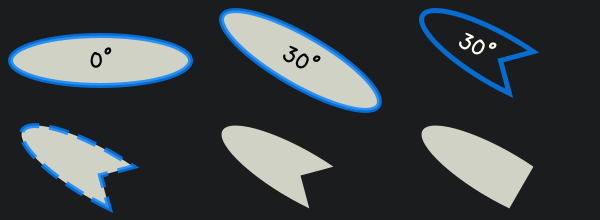
The code listing to create this visualization is shown in the RTD tutorial section on ellipses.
- draw_gradient(self: viren2d.Painter, gradient: viren2d::ColorGradient) bool
Draws a color gradient.
Corresponding C++ API:
viren2d::Painter::DrawGradient.- Parameters:
gradient – The
ColorGradientto draw.- Returns:
Trueif drawing completed successfully. Otherwise, check the log messages. Drawing errors are most likely caused by invalid inputs.
Example
>>> grad = viren2d.LinearColorGradient((0, 0), (200, 200))
>>> grad.add_color_stop(0.1, 'crimson')
>>> grad.add_color_stop(0.5, 'teal-green')
>>> grad.add_color_stop(0.9, 'navy-blue')
>>> painter.draw_gradient(grad)
Note
This method will render the gradient across the full canvas. If this is not wanted, a clip region must be set up before via
set_clip_rect()orset_clip_circle().
- draw_grid(self: viren2d.Painter, spacing_x: float, spacing_y: float, line_style: viren2d.LineStyle = <LineStyle(2.0px, #007fff, solid)>, top_left: viren2d.Vec2d = viren2d.Vec2d(0, 0), bottom_right: viren2d.Vec2d = viren2d.Vec2d(0, 0)) bool
Draws a grid.
Corresponding C++ API:
viren2d::Painter::DrawGrid.- Parameters:
spacing_x – Width of each grid cell as
float.spacing_y – Height of each grid cell as
float.line_style – A
LineStylespecifying how to render the grid lines.top_left – Top-left corner as
Vec2d. If provided andtop_left != `bottom_right, the grid will only be drawn within this rectangular region. Otherwise, the grid will span the whole canvas.bottom_right – Bottom-right corner as
Vec2d. Seetop_left.
- Returns:
Trueif drawing completed successfully. Otherwise, check the log messages. Drawing errors are most likely caused by invalid inputs.
Example
>>> line_style = viren2d.LineStyle(width=1, color='light-gray!80')
>>> painter.draw_grid(
>>>     spacing_x=50, spacing_y=50, line_style=line_style,
>>>     top_left=(50, 50), bottom_right=(150, 150))
- draw_horizon_line(self: viren2d.Painter, K: numpy.ndarray[numpy.float64[3, 3]], R: numpy.ndarray[numpy.float64[3, 3]], t: viren2d.Vec3d, line_style: viren2d.LineStyle = <LineStyle(5.0px, #1670b7, dashed)>) viren2d.Line2d
Draws the estimated line of horizon.
TODO explain approximation/estimation. Or adjust it in wkz!
Corresponding C++ API:
viren2d::Painter::DrawHorizonLine.- Parameters:
K – The \(3 \times 3\) camera matrix as
numpy.ndarrayof typenumpy.float64, which holds the intrinsic parameters.R – The \(3 \times 3\) extrinsic rotation matrix, again as
numpy.ndarrayof typenumpy.float64.t – The 3d extrinsic translation vector as
Vec3d.line_style – The
LineStylespecifying how the horizon line should be drawn.
- Returns:
The line of horizon as
Line2d. Use itsis_valid()method to check whether the line could be drawn. If not, it is either not visible or you provided invalid inputs. The latter will be indicated by an error message in the log.
Example
>>> K = np.array(
>>>     [[523.2, 0.0, 341.0],
>>>      [0.0, 523.2, 256.0],
>>>      [0.0, 0.0, 1.0]], dtype=np.float64)
>>> R = np.array(
>>>     [[ 0.99013141,  0.14006482, -0.00465153],
>>>      [ 0.05439048, -0.41465762, -0.90835056],
>>>      [-0.12915675,  0.89913342, -0.41818372]], dtype=np.float64)
>>> t = np.array([-51.8, 17.3, 82.5], dtype=np.float64)
>>> line_style =
>>> TODO
- draw_image(self: viren2d.Painter, image: object, position: viren2d.Vec2d, anchor: viren2d.Anchor = viren2d.Anchor('top-left'), alpha: float = 1.0, scale_x: float = 1.0, scale_y: float = 1.0, rotation: float = 0.0, clip_factor: float = 0.0, line_style: viren2d.LineStyle = <LineStyle::Invalid>) bool
Draws an image onto the canvas.
Corresponding C++ API:
viren2d::Painter::DrawImage.- Parameters:
image – The image as
ImageBuffer, which can also be implicitly created by passing anumpy.ndarray.position – The position of the reference point where to anchor the image as
Vec2d.anchor – How to orient the text with respect to
position. Valid inputs areAnchorvalues and their string representations. For details, refer to theanchorparameter ofdraw_text().alpha – Opacity as
float\(\in [0,1]\), where1is fully opaque and0is fully transparent.scale_x – Horizontal scaling factor as
float.scale_y – Vertical scaling factor as
float.rotation – Clockwise rotation in degrees as
float.clip_factor – If greater than 0, the corners will be clipped. In particular, \(0 < \text{clip} \leq 0.5\) will result in a rounded rectangle, where the corner radius will be
clip_factortimes \(\min(\text{width}, \text{height})\). If \(\text{clip} > 0.5\), the clip region will be an ellipse, where major/minor axis length equal the width/height of the image.line_style – A
LineStylespecifying how to draw the contour. If set toLineStyle.Invalid, the contour will not be drawn.
- Returns:
Trueif drawing completed successfully. Otherwise, check the log messages. Drawing errors are most likely caused by invalid inputs.
Example
>>> painter.draw_image(
>>>     image=img, position=(10, 20), anchor='top-left',
>>>     alpha=0.8, scale_x=1.0, scale_y=1.0, rotation=0,
>>>     clip_factor=0.3, line_style=viren2d.LineStyle.Invalid)
- draw_line(self: viren2d.Painter, pt1: viren2d.Vec2d, pt2: viren2d.Vec2d, line_style: viren2d.LineStyle = <LineStyle(2.0px, #007fff, solid)>) bool
Draws a line.
Corresponding C++ API:
viren2d::Painter::DrawLine.- Parameters:
- Returns:
Trueif drawing completed successfully. Otherwise, check the log messages. Drawing errors are most likely caused by invalid inputs.
Example
>>> line_style = viren2d.LineStyle(
>>>     width=7, color='crimson!80',
>>>     dash_pattern=[20, 10], dash_offset=0.0,
>>>     cap='round', join='miter')
>>> painter.draw_line(
>>>     pt1=(42, 42), pt2=(86, 86), line_style=line_style)
- draw_marker(self: viren2d.Painter, position: viren2d.Vec2d, marker_style: viren2d.MarkerStyle = <MarkerStyle('o', sz=10.0, t=3.0, #007fff)>) bool
Draws a single marker/keypoint.
Corresponding C++ API:
viren2d::Painter::DrawMarker.- Parameters:
position – Position as
Vec2d.marker_style – A
MarkerStylespecifying how to draw the marker.
- Returns:
Trueif drawing completed successfully. Otherwise, check the log messages. Drawing errors are most likely caused by invalid inputs.
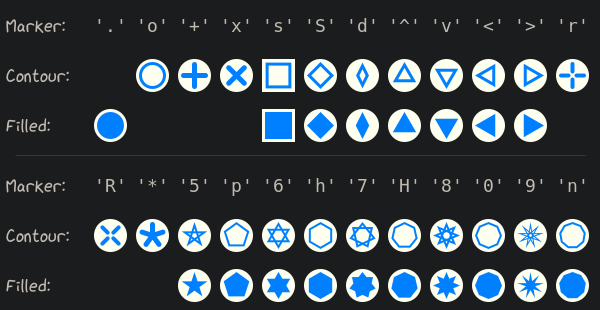
Example
>>> marker_style = viren2d.MarkerStyle(
>>>     marker='7', size=20, color='navy-blue!80',
>>>     thickness=1, filled=True,
>>>     cap='round', join='miter')
>>> painter.draw_marker(position=(42, 70), marker_style=marker_style)
- draw_markers(self: viren2d.Painter, markers: List[Tuple[viren2d.Vec2d, viren2d.Color]], marker_style: viren2d.MarkerStyle = <MarkerStyle('o', sz=10.0, t=3.0, #007fff)>) bool
Draws multiple (similarly styled) markers/keypoints.
Corresponding C++ API:
viren2d::Painter::DrawMarkers.- Parameters:
markers – Holds the position and color of each marker. Should be provided as a
listoftuples, where eachtupleholds the position and color of a marker as (Vec2d,Color). If a marker’s color is invalid, it will be drawn usingmarker_style’s color specification instead.marker_style – A
MarkerStylespecifying how to draw the markers (except for the color).
- Returns:
Trueif drawing completed successfully for all markers. Otherwise, check the log messages. Drawing errors are most likely caused by invalid inputs.
Example
>>> marker_style = viren2d.MarkerStyle(color='crimson')
>>> markers = [
>>>     ((10, 10), 'blue'),
>>>     ((20, 10), (0.5, 0, 0.5)),
>>>     ((30, 10), viren2d.RGBa(200, 0, 180)),
>>>     ((40, 10), 'invalid'),   # Will use marker_style.color
>>>     ((50, 34), (-1, -1, -1)) # This one too
>>> ]
>>> painter.draw_markers(markers, marker_style)
- draw_polygon(self: viren2d.Painter, polygon: List[viren2d.Vec2d], line_style: viren2d.LineStyle = <LineStyle(2.0px, #007fff, solid)>, fill_color: viren2d.Color = viren2d.Color.Invalid) bool
Draws a polygon.
Corresponding C++ API:
viren2d::Painter::DrawPolygon.- Parameters:
- Returns:
Trueif drawing completed successfully. Otherwise, check the log messages. Drawing errors are most likely caused by invalid inputs.
Example
>>> points = [(0, 0), (10, 20), (42, 30), ...]
>>> line_style = viren2d.LineStyle(
>>>     width=5, color='forest-green',
>>>     dash_pattern=[], dash_offset=0.0,
>>>     cap='round', join='round')
>>> painter.draw_polygon(
>>>     polygon=points, line_style=line_style,
>>>     fill_color='same!40')
- draw_rect(self: viren2d.Painter, rect: viren2d.Rect, line_style: viren2d.LineStyle = <LineStyle(2.0px, #007fff, solid)>, fill_color: viren2d.Color = viren2d.Color.Invalid) bool
Draws a rectangle.
Corresponding C++ API:
viren2d::Painter::DrawRect.- Parameters:
- Returns:
Trueif drawing completed successfully. Otherwise, check the log messages. Drawing errors are most likely caused by invalid inputs.
Example
>>> line_style = viren2d.LineStyle()
>>> painter.draw_rect(
>>>   rect=rect, line_style=line_style, fill_color='same!20')
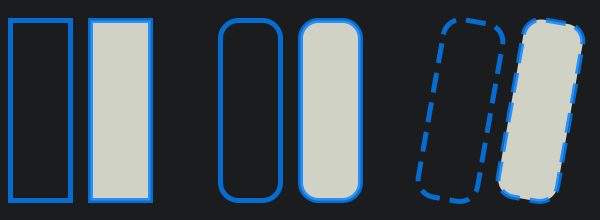
The code listing to create this visualization is shown in the RTD tutorial section on rectangles.
- draw_text(self: viren2d.Painter, text: List[str], position: viren2d.Vec2d, anchor: viren2d.Anchor = viren2d.Anchor('bottom-left'), text_style: viren2d.TextStyle = <TextStyle("monospace", 16px, ls=1.2, left, top, #000000)>, padding: viren2d.Vec2d = viren2d.Vec2d(0, 0), rotation: float = 0.0) viren2d.Rect
Draws single- or multi-line text.
Corresponding C++ API:
viren2d::Painter::DrawText.- Parameters:
text – A
listofstrto be drawn. For a single line, simply pass alistwhich holds only a singlestr.position – Position of the reference point where to anchor the text as
Vec2d.anchor –
How to orient the text with respect to the
position. Valid inputs areAnchorvalues and their string representations.A string must correspond either to a position specification - i.e.
center,top,top-right,right,bottom-right,bottom,bottom-left,left, ortop-left- or one of the 8 compass directions - i.e.north,north-east,east,south-east,south,south-west,west, ornorth-west.Before parsing, the input string will be converted to lowercase and any whitespaces, dashes & underscores will be removed.
text_style – A
TextStyle, specifying how to render the text.padding – Optional distance between the closest glyph and the
position. Specified in pixels asVec2d.rotation – Rotation angle (clockwise around
position) in degrees asfloat.
- Returns:
The bounding box of the drawn text as
Rect. Check if drawing completed successfully viais_valid().
Example
>>> text_style = viren2d.TextStyle(
>>>     family='sans-serif', size=15, color='#1a1c1d', bold=True)
>>> bbox = painter.draw_text(
>>>     text=['Hello World!'], position=(200, 50), anchor='center',
>>>     text_style=text_style, padding=(5, 5), rotation=0)
- draw_text_box(self: viren2d.Painter, text: List[str], position: viren2d.Vec2d, anchor: viren2d.Anchor = viren2d.Anchor('bottom-left'), text_style: viren2d.TextStyle = <TextStyle("monospace", 16px, ls=1.2, left, top, #000000)>, padding: viren2d.Vec2d = viren2d.Vec2d(6, 6), rotation: float = 0.0, line_style: viren2d.LineStyle = <LineStyle::Invalid>, fill_color: viren2d.Color = viren2d.Color(red=1, green=1, blue=1, alpha=0.6), radius: float = 0.2, fixed_size: viren2d.Vec2d = viren2d.Vec2d(-1, -1)) viren2d.Rect
Draws a single- or multi-line text box.
Corresponding C++ API:
viren2d::Painter::DrawTextBox.- Parameters:
text – A
listofstrto be drawn. For a single line, simply pass alistwhich holds a singlestr.position – Position of the reference point where to anchor the text as
Vec2d.anchor – How to orient the text with respect to
position. Valid inputs areAnchorvalues and their string representations. For details, refer to theanchorparameter ofdraw_text().text_style – A
TextStyle, specifying how to render the text.padding – Optional padding between text and the edges of the box. Specified in pixels as
Vec2d.rotation – Rotation angle (clockwise around
position) in degrees asfloat.line_style – A
LineStyle, specifying how to render the border of the text box.fill_color – If you provide a valid
Color, the box will be filled.radius – Corner radius of the box. Refer to
radiusfor details on valid value ranges.fixed_size – Forces the box to be of the specified size as
Vec2d. If the size is smaller than the text extent, the text will overflow the box.
- Returns:
The bounding box of the drawn text as
Rect. Check if drawing completed successfully viais_valid().
Example
>>> text_style = viren2d.TextStyle(
>>>     family='sans-serif', size=15, color='#1a1c1d', bold=True)
>>> line_style = viren2d.LineStyle(
>>>     width=3, color='#1a1c1d')
>>> bbox = painter.draw_text_box(
>>>     text=['Hello World!'], position=(200, 50), anchor='center',
>>>     text_style=text_style, padding=(5, 5), rotation=0,
>>>     line_style=line_style, fill_color='#c0bab1', radius=0.2)
- draw_trajectories(self: viren2d.Painter, trajectories: List[Tuple[List[viren2d.Vec2d], viren2d.Color]], line_style: viren2d.LineStyle = <LineStyle(5.0px, #007fff, solid)>, fade_out_color: viren2d.Color = viren2d.Color(red=0.78, green=0.78, blue=0.78, alpha=0.6), tail_first: bool = True, smoothing_window: int = 0, fading_factor: Callable[[float], float] = <built-in method of PyCapsule object at 0x7f0f96b10ba0>) bool
Draws multiple (similarly styled) trajectories.
Corresponding C++ API:
viren2d::Painter::DrawTrajectories.Allows rendering multiple trajectories with a common
LineStyle.- Parameters:
trajectories –
A
listoftuple, where eachtupleholds(trajectory, color):trajectoryis alistofVec, i.e. the coordinates.coloris the correspondingColor. IfColor.InvalidorColor.Same, the color of theline_styleparameter will be used instead.
others – For details on all other parameters, refer to the documentation of
draw_trajectory().
- Returns:
Trueif drawing all trajectories completed successfully. Otherwise, check the log messages. Drawing errors are most likely caused by invalid inputs.
Example
>>> points1 = [(20,  0), (10, 20), (42, 30), ...]
>>> points2 = [(70, 70), (50, 20), (23, 30), ...]
>>> trajs = [(points1, 'maroon'), (points2, 'invalid')]
>>>
>>> line_style = viren2d.LineStyle(
>>>     width=5, color='navy-blue',
>>>     cap=viren2d.LineCap.Round,
>>>     join=viren2d.LineJoin.Round)
>>>
>>> painter.draw_trajectories(
>>>     trajectories=trajs, line_style=line_style,
>>>     fade_out_color=(0.8, 0.8, 0.8, 0.4),
>>>     smoothing_window=5, tail_first=True,
>>>     fading_factor=viren2d.fade_out_linear)
The code listing to create this visualization is shown in the RTD tutorial section on tracking-by-detection.
- draw_trajectory(self: viren2d.Painter, trajectory: List[viren2d.Vec2d], line_style: viren2d.LineStyle = <LineStyle(5.0px, #007fff, solid)>, fade_out_color: viren2d.Color = viren2d.Color(red=0.78, green=0.78, blue=0.78, alpha=0.6), tail_first: bool = True, smoothing_window: int = 0, fading_factor: Callable[[float], float] = <built-in method of PyCapsule object at 0x7f0f96b10b10>) bool
Draws a single trajectory.
Corresponding C++ API:
viren2d::Painter::DrawTrajectory.Can be used to either draw a fixed-color path (if
fade_out_coloris invalid), or a path which gradually changes its color fromline_style.colortofade_out_color. In the latter case, the color transition can be controlled byfading_factor.- Parameters:
trajectory – A
listofVec2dwhich specifies the trajectory’s coordinates.line_style – A
LineStylespecifying how to draw the trajectory (except for the color gradient).fade_out_color – If this is a valid
Color, the trajectory’s tail will be drawn with this color.tail_first – Set to
Trueif the first point, i.e.points[0], is the oldest point, i.e. the trajectory’s tail. Otherwise, it is assumed to be the most recent point.smoothing_window – Specifies the window size to optionally smooth the trajectory via moving average. Disable smoothing by passing a value
<= 0.fading_factor –
A function handle which will be invoked for each segment of the trajectory to compute the mixing ratios for the color gradient.
Its single input is a
float\(\in [0,1]\), which denotes the drawing progress along the trajectory, from head (i.e. \(0\)) to tail. Its return value must also be afloat\(\in [0,1]\), which specifies the amount of thefade_out_colorto be applied for this drawing progress.For example, to get a linear color transition between head and tail, we simply use the identity function. For convenience,
viren2dalready providesfade_out_linear(),fade_out_quadratic(), andfade_out_logarithmic(). The defaultfading_factorfunction isfade_out_quadratic().
- Returns:
Trueif drawing completed successfully. Otherwise, check the log messages. Drawing errors are most likely caused by invalid inputs.
Example
>>> points = [(0, 0), (10, 20), (42, 30), ...]
>>> line_style = viren2d.LineStyle(
>>>     width=5, color='navy-blue',
>>>     cap=viren2d.LineCap.Round,
>>>     join=viren2d.LineJoin.Round)
>>>
>>> painter.draw_trajectory(
>>>     trajectory=points, line_style=line_style,
>>>     fade_out_color=(0.8, 0.8, 0.8, 0.4),
>>>     smoothing_window=5, tail_first=True,
>>>     fading_factor=viren2d.fade_out_linear)
Note
If a valid
fade_out_coloris provided, the trajectory has to be drawn via separate line segments. This means that thejoinsetting ofline_styleparameter will have no effect. Additionally, if transparent colors are used, the individual segment endpoints will be visible.To avoid this behavior, the trajectory needs to be drawn with a single color, i.e. pass
Color.Invalidasfade_out_color.The code listing to create this visualization is shown in the RTD tutorial section on tracking-by-detection.
- draw_xyz_axes(self: viren2d.Painter, K: numpy.ndarray[numpy.float64[3, 3]], R: numpy.ndarray[numpy.float64[3, 3]], t: viren2d.Vec3d, origin: viren2d.Vec3d = viren2d.Vec3d(0, 0, 0), lengths: viren2d.Vec3d = viren2d.Vec3d(1000, 1000, 1000), arrow_style: viren2d.ArrowStyle = <ArrowStyle(lw=2.0, tip=0.2, angle=20.0°, open, #007fff, solid)>, color_x: viren2d.Color = viren2d.Color(red=0.94, green=0.13, blue=0.15, alpha=1), color_y: viren2d.Color = viren2d.Color(red=0.19, green=0.63, blue=0.3, alpha=1), color_z: viren2d.Color = viren2d.Color(red=0.09, green=0.44, blue=0.72, alpha=1)) Tuple[bool, viren2d.Vec2d, viren2d.Vec2d, viren2d.Vec2d, viren2d.Vec2d]
Visualizes a coordinate system reference frame.
Draws three arrows showing the orientation of the x, y, and z axes at a given position. Note that the default parameter settings assume that the metric camera calibration is given in millimeters.
Corresponding C++ API:
viren2d::Painter::DrawXYZAxes.- Parameters:
K – The \(3 \times 3\) camera matrix as
numpy.ndarraywhich holds the intrinsic parameters. Inputs will be converted to typenumpy.float64.R – The \(3 \times 3\) extrinsic rotation matrix, as
numpy.ndarray. Inputs will be converted to typenumpy.float64.t – The 3d extrinsic translation vector as
Vec3d.origin – Center of the world coordinate system as
Vec3d.lengths – A
Vec3dspecifying how far to shift the arrow tips from the origin. Each axis tip will be computed as \(\text{tip}_{\text{axis}} = \text{origin} + \mathbf{e}_{\text{axis}} * \text{lengths}[\text{axis}]\), where \(\mathbf{e}_{\text{axis}}\) is the unit vector for the corresponding axis. The default value assumes that the calibration is given in millimeters and will result in 1 meter long arrows.arrow_style – The
ArrowStylespecifying how the axis arrows should be drawn. Note that it’s color attribute will be ignored.color_x –
Colorof the \(x\) axis arrow. Default reddish.color_y –
Colorof the \(y\) axis arrow. Default greenish.color_z –
Colorof the \(z\) axis arrow. Default bluish.
- Returns:
A
tuple(visible, origin, tip_x, tip_y, tip_z), wherevisibleisTrueif drawing completed successfully and at least one point (axis arrow tip or the origin) is visible within the camera’s field-of-view. Drawing errors (such as caused by invalid inputs) will be indicated by log messages. The other result variables are of typeVec2dand hold the image coordinates of theorigin, as well as the tips (i.e. end points) of the arrows.
Example
>>> K = np.array(
>>>     [[523.2, 0.0, 341.0],
>>>      [0.0, 523.2, 256.0],
>>>      [0.0, 0.0, 1.0]], dtype=np.float64)
>>> R = np.array(
>>>     [[ 0.99013141,  0.14006482, -0.00465153],
>>>      [ 0.05439048, -0.41465762, -0.90835056],
>>>      [-0.12915675,  0.89913342, -0.41818372]], dtype=np.float64)
>>> t = np.array([-51.8, 17.3, 82.5], dtype=np.float64)
>>> arrow_style = viren2d.ArrowStyle(
>>>     width=3, tip_length=0.3, tip_angle=20,
>>>     tip_closed=True, double_headed=False,
>>>     dash_pattern=[], dash_offset=0.0,
>>>     cap='round', join='miter')
>>> # This examplary calibration uses millimeters, thus the lengths
>>> # parameter corresponds to 1m along each axis.
>>> painter.draw_xyz_axes(
>>>     K=K, R=R, t=t, origin=(0, 0, 0),
>>>     lengths=(1e3, 1e3, 1e3), arrow_style=arrow_style,
>>>     color_x='red', color_y='green', color_z='blue')
- get_canvas(self: viren2d.Painter, copy: bool = True) viren2d.ImageBuffer
Returns the current visualization in RGBA format.
Returns an
ImageBuffer, which implements the Python buffer protocol. This means, it can be easily converted to other buffer types, such asnumpy.ndarray, see the examples below.Corresponding C++ API:
viren2d::Painter::GetCanvas.- Parameters:
copy –
If you want a deep copy, set
copy = True. Otherwise, the buffer will just provide a shared view on the painter’s canvas.Be aware that if you keep on drawing after obtaining a shared view, this view will also change. You could even externally modify the canvas pixels.
- Returns:
The current visualization as a 4-channel,
uint8ImageBufferwith pixel format RGBA.
Examples
Get canvas as
numpy.ndarray, where the memory is shared with the painter:>>> img_np = np.array(p.get_canvas(copy=False), copy=False)
Retrieve a deep copy of the canvas as
numpy.ndarray, i.e. futurepainter.draw_...calls will not affect this retrieved copy:>>> img_np = np.array(p.get_canvas(copy=True), copy=False)
If we need a 3-channel image, we can leverage the
to_channels()method of the buffer:>>> # We only need a shared view on the canvas... >>> img_buf = p.get_canvas(copy=False) >>> # ... because the following performs a deep copy: >>> img_np = img_buf.to_channels(3)
Tip
If you can ensure that the painter is not destroyed while you display/process the visualization, use the shared view (i.e.
copy = False) on its canvas to avoid unnecessary memory allocation.
- get_canvas_size(self: viren2d.Painter) tuple
Returns the size of the canvas in pixels.
Corresponding C++ API:
viren2d::Painter::GetCanvasSize.
- property height
Height in pixels of the painter’s canvas (read-only).
Corresponding C++ API:
viren2d::Painter::GetCanvasSize.- Type:
- is_valid(self: viren2d.Painter) bool
Checks if the canvas has been set up correctly.
Corresponding C++ API:
viren2d::Painter::IsValid.
- reset_clip(self: viren2d.Painter) bool
Resets the latest clip region.
Note that for each previously set clip region, a separate call to
reset_clip()is needed.Corresponding C++ API:
viren2d::Painter::ResetClipRegion.
- save_canvas(self: viren2d.Painter, filename: object) None
Saves the current visualization to disk.
This method is provided only for convenience and simply calls
get_canvas()andsave_image_uint8(). Check their documentation to be aware about the shortcomings (sinceviren2dis not an image I/O library).No corresponding C++ API: Use
viren2d::Painter::GetCanvasandviren2d::Painter::SaveImageUInt8(or preferably a proper image I/O library) instead.- Parameters:
filename – The output filename as
strorpathlib.Path. The calling code must ensure that the directory hierarchy exists.
Example
>>> output_folder = pathlib.Path(...)
>>> painter.save_canvas(output_folder / 'visualization.jpg')
- set_canvas_filename(self: viren2d.Painter, image_filename: object) None
Initializes the canvas from the given image file.
This functionality uses the stb library to load the image file. Supported formats are:
JPEG, PNG, TGA, BMP, PSD, GIF, HDR, PIC, PNM
Corresponding C++ API:
viren2d::Painter::SetCanvas.
- set_canvas_image(self: viren2d.Painter, image: object) None
Initializes the canvas from the given image.
Corresponding C++ API:
viren2d::Painter::SetCanvas.- Parameters:
img_np – Image as either a
numpy.ndarray(currently, onlynumpy.uint8is supported) or anImageBuffer. The image can either be grayscale, RGB or RGBA.
Example
>>> img_np = np.zeros((480, 640, 3), dtype=np.uint8)
>>> painter.set_canvas_image(img_np)
- set_canvas_rgb(self: viren2d.Painter, height: int, width: int, color: viren2d.Color = viren2d.Color(red=1, green=1, blue=1, alpha=1)) None
Initializes the canvas with the given color.
Corresponding C++ API:
viren2d::Painter::SetCanvas.- Parameters:
width – Canvas width in pixels.
height – Canvas height in pixels.
color – Background
Color.
Examples
>>> painter = viren2d.Painter()
>>> painter.set_canvas_rgb(height=600, width=800)
>>> painter.set_canvas_rgb(width=800, height=600, color='crimson')
>>> painter.set_canvas_rgb(width=800, height=600, color=(0.5, 0.3, 0.9))
- set_clip_circle(self: viren2d.Painter, center: viren2d.Vec2d, radius: float) bool
Establishes a circular clip region for the current canvas.
After setting the clip region, any drawing operations outside the clip region are effectively masked out. Note that this does not change the canvas transformation, i.e. coordinates for subsequent drawing operations need to be provided in the global/previous canvas coordinate frame. Also note that the clip region will be reset automatically whenever a new canvas is set. To reset the clip region, use
reset_clip().Corresponding C++ API:
viren2d::Painter::SetClipRegion.- Parameters:
center – Center of the circle as
Vec2d.radius – Radius of the circle.
- Returns:
Trueif the given clip region is valid,Falseotherwise which will be indicated by log messages.
Example
>>> # Circular clip region and radial gradient for 3D impression:
>>> grad = viren2d.RadialColorGradient((90, 90), 10, (90, 90), 90);
>>> grad.add_color_stop(0.0, 'white')
>>> grad.add_color_stop(1.0, 'light-gray')
>>> painter.set_clip_circle((60, 60), 40)
>>> painter.draw_gradient(grad)
- set_clip_rect(self: viren2d.Painter, rect: viren2d.Rect) bool
Establishes a rectangular clip region for the current canvas.
After setting the clip region, any drawing operations outside the clip region are effectively masked out. Note that this does not change the canvas transformation, i.e. coordinates for subsequent drawing operations need to be provided in the global/previous canvas coordinate frame. Also note that the clip region will be reset automatically whenever a new canvas is set. To reset the clip region, use
reset_clip().Corresponding C++ API:
viren2d::Painter::SetClipRegion.- Parameters:
rect – A
Rectdefining the rectangular clipping region, optionally rotated and with rounded corners).- Returns:
Trueif the given clip region is valid,Falseotherwise which will be indicated by log messages.
Example
>>> TODO