Optical Flow Colorization
Optical flow fields can be visualized via
colorize_optical_flow(). There is also an option to illustrate
the selected color schema via optical_flow_legend(), to overlay
the color wheel as in the following example:
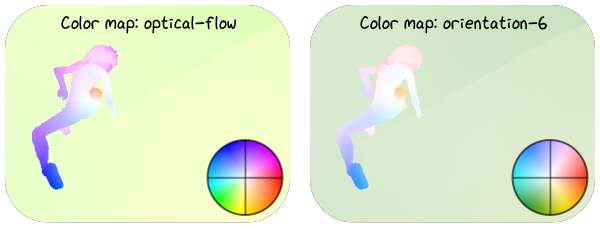
This visualization shows a crop of the alley2 sequence from the MPI SINTEL optical flow dataset colorized with different cyclic color maps. Corresponding Python code:
 1flow_full = viren2d.load_optical_flow(
 2    VIREN2D_DATA_PATH / 'sintel-alley2.flo')
 3flow = flow_full.roi(495, 20, 380, 290)
 4(_, max_motion, _, _) = flow.magnitude().min_max(0)
 5
 6painter = viren2d.Painter(height=230, width=600, color='white!0')
 7grid_style = viren2d.LineStyle(2, "black!60")
 8text_style = viren2d.TextStyle(family='xkcd', size=18)
 9
10scale = (painter.width / 2 - 15) / flow.width
11
12for cmap, x in [('optical-flow', 5), ('orientation-6', 310)]:
13    flow_vis = viren2d.colorize_optical_flow(
14        flow=flow, colormap=cmap, motion_normalizer=max_motion)
15
16    painter.draw_image(
17        flow_vis, position=(x, 5), anchor='topleft', clip_factor=0.2,
18        scale_x=scale, scale_y=scale)
19
20    legend = viren2d.optical_flow_legend(
21        size=100, colormap=cmap, line_style=grid_style)
22
23    painter.draw_image(
24        legend,
25        position=(
26            x + (flow_vis.width - 10) * scale,
27            5 + (flow_vis.height - 10) * scale),
28        anchor='bottom-right', line_style=grid_style, clip_factor=1,
29        scale_x=scale, scale_y=scale)
30
31    painter.draw_text(
32        [f'Color map: {cmap}'], position=(
33            x + flow_vis.width * scale / 2, 10),
34        anchor='top', text_style=text_style)
Using a ColorGradient, colorized flow can be aesthetically
overlaid onto the input image as in the following example:
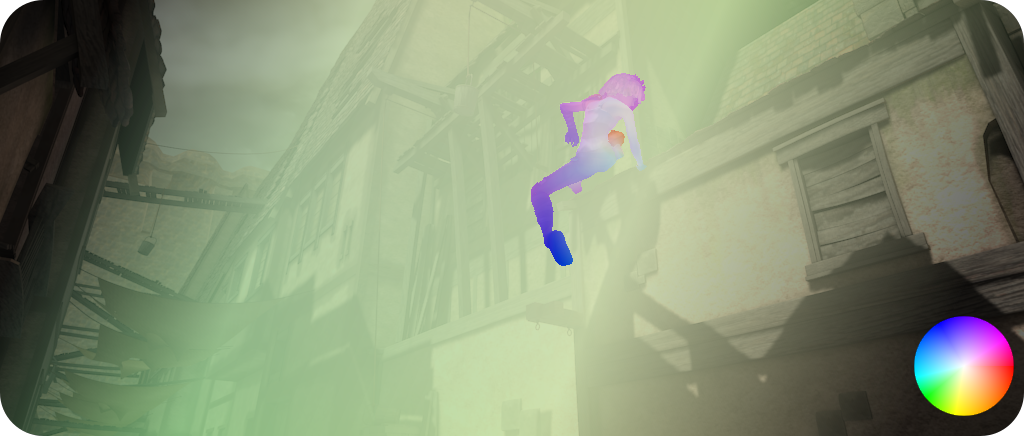
Corresponding Python code:
 1img = viren2d.load_image_uint8(VIREN2D_DATA_PATH / 'sintel-alley2.png')
 2img_dimmed = img.dim(0.4)
 3
 4# Colorize optical flow
 5colormap = 'optical-flow'
 6flow = viren2d.load_optical_flow(VIREN2D_DATA_PATH / 'sintel-alley2.flo')
 7(_, max_motion, _, _) = flow.magnitude().min_max(0)
 8flow_vis = viren2d.colorize_optical_flow(
 9        flow=flow, colormap=colormap, motion_normalizer=max_motion)
10
11# Blend input image & flow with a smooth gradient
12grad = viren2d.LinearColorGradient((0, 0), (img.width, img.height))
13grad.add_intensity_stop(0.1, 1.0)
14grad.add_intensity_stop(0.3, 0.3)
15grad.add_intensity_stop(0.6, 0.2)
16grad.add_intensity_stop(0.9, 1.0)
17alpha = grad.mask(width=img.width, height=img.height, channels=1)
18
19vis = flow_vis.blend_mask(img_dimmed, alpha)
20
21# Overlay color map legend
22legend = viren2d.optical_flow_legend(size=100, colormap=colormap)
23painter = viren2d.Painter(
24    width=vis.width, height=vis.height + 10, color='white!0')
25painter.draw_image(vis, position=(0, 0), anchor='top-left', clip_factor=0.1)
26painter.draw_image(
27    legend, position=(vis.width - 10, vis.height - 20),
28    anchor='bottom-right', clip_factor=1)