Image Overlays
Images can be superimposed onto the canvas via draw_image().
If only a region of interest should be overlaid, this can be selected via
roi().
To position an image, you simply need a reference position (i.e.
\(x\) and \(y\) coordinate) and choose a proper Anchor. The following
visualization uses the “gouldian” color map to
colorize example data computed by the well-known
peaks function:
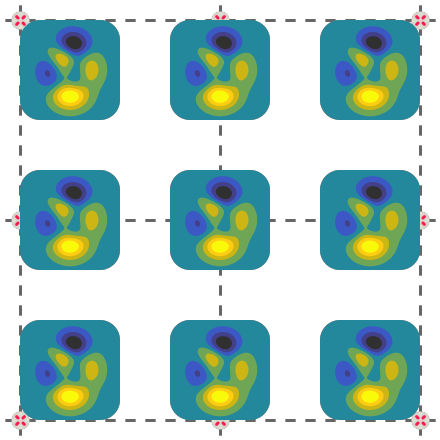
 1# Prepare the image to be overlaid
 2peaks = viren2d.peaks()
 3vis = viren2d.colorize_scaled(
 4    data=peaks, colormap='gouldian', low=-6.5, high=8, bins=8)
 5scaling = 100 / peaks.width
 6
 7x = offset_x
 8y = offset_y
 9for anchor in viren2d.Anchor.list_all():
10    pos = (x, y)
11    if anchor != viren2d.Anchor.Center:
12        painter.draw_marker(pos, marker_style)
13
14    painter.draw_image(
15        image=vis, position=pos, anchor=anchor,
16        scale_x=scaling, scale_y=scaling, rotation=0,
17        clip_factor=0.2, alpha=1.0)
18
19    x += delta_x
20    if x >= canvas_width:
21        x = offset_x
22        y += delta_y