Handling Image Data
Encapsulates image data. |
|
Creates a collage. |
|
Returns an image where the specified color range is highlighted. |
|
Converts a grayscale image to RGB(A). |
|
Converts a HSV image to RGB(A)/BGR(A). |
|
Converts RGB(A)/BGR(A) images to grayscale. |
|
Converts a RGB(A)/BGR(A) image to HSV. |
|
Reads an 8-bit image from disk. |
|
Stores an 8-bit image to disk as either JPEG or PNG. |
ImageBuffer
Note
Since an ImageBuffer uses standard row-major memory
layout, it can be swiftly converted to native types of common image
processing libraries. For details and example code, refer to the
tutorial on type conversion.
- class viren2d.ImageBuffer
Encapsulates image data.
This class is primarily used to pass images between the client application and
viren2d. Supported data types are:numpy.uint8,numpy.int16,numpy.uint16,numpy.int32,numpy.uint32,numpy.int64,numpy.uint64,numpy.float32, andnumpy.float64. Additionally, it provides several basic image manipulation methods to adjust an image quickly for visualization.The ImageBuffer implements the standard Python buffer protocol and can thus be swiftly converted to/from other buffer types, such as a
numpy.ndarray, for example:>>> # Create a shared ImageBuffer from a numpy.ndarray >>> img_buf = viren2d.ImageBuffer(img_np, copy=False)
>>> # Create a shared numpy.ndarray from an ImageBuffer
>>> img_np = np.array(img_buf, copy=False)
Important
A
numpy.ndarraycan be implicitly converted to anImageBuffer. Thus, there is no need for explicit conversion when calling aviren2dfunction which expects anImageBuffer.Note that by default,
viren2dtries to create a shared buffer. However, if the inputnumpy.ndarrayis not row-major, the implicit conversion will always create a copy. This would result in a warning message. To avoid this warning, either explicitly create a copy viaviren2d.ImageBuffer(non_row_major_array, copy=True), or disable the warning via the optional parameterviren2d.ImageBuffer(non_row_major_array, disable_warnings=True). Alternatively, the inputnumpy.ndarraycould be converted to a C-style before invoking anyviren2dfunction, e.g. vianumpy.ascontiguousarray().Methods:
Creates an ImageBuffer from a
numpy.ndarray.Returns an alpha-blended image.
Returns an alpha-blended image.
Extracts a single channel.
Returns a deep copy.
Returns a scaled version of this image as \(\alpha * \text{self}\).
Returns
Trueif this buffer points to a valid memory location.Computes the magnitude along the channels.
Computes the min/max values and locations for the given channel.
Computes the orientation in radians as \(\operatorname{atan2}\left(I(r, c, 1), I(r, c, 0)\right)\).
Pixelates a rectangular region of interest in-place.
Returns an ImageBuffer which points to the given region of interest.
Swaps the specified channels in-place.
Returns a copy with duplicated channels or removed alpha channel.
Converts this buffer to
float32.Converts this buffer to
uint8.Attributes:
Number of channels (read-only).
Underlying data type (read-only).
Image height in pixels (read-only).
Number of bytes a single buffer element occupies (read-only).
Read-only flag indicating whether this
ImageBufferowns the image data and is thus responsible for cleaning up.Stride in bytes per pixel (read-only).
Stride in bytes per row (read-only).
Shape of the buffer as
(H, W, C)tuple (read-only).Image width in pixels (read-only).
- __init__(self: viren2d.ImageBuffer, array: numpy.ndarray, copy: bool = False, disable_warnings: bool = False) None
Creates an ImageBuffer from a
numpy.ndarray.Note
If the provided array is “incompatible” with the ImageBuffer implementation (e.g. requesting a shared buffer but the array is not mutable, or the array view has negative strides, etc.), the ImageBuffer will enforce a deep copy (as this results in a contiguous, row-major buffer). If this overrides the
copyparameter, a warning message will be logged, unless you setdisable_warningsexplicitly.- Parameters:
array – The
numpy.ndarrayholding the image data.copy – If
True, theImageBufferwill make a deep copy of the givenarray.disable_warnings – If
True, warnings about overriding thecopyparameter will be silenced.
- blend_constant(self: viren2d.ImageBuffer, other: viren2d.ImageBuffer, alpha: float) viren2d.ImageBuffer
Returns an alpha-blended image.
Creates a new image as the result of \((1 - \alpha) * \text{self} + \alpha * \text{other}\). If the number of channels is not the same, the number of output channels will be the maximum of
self.channelsandother.channels. In this case, non-blendable channels are copied from the input buffer which has more channels.Corresponding C++ API:
viren2d::ImageBuffer::Blend.- Parameters:
other – The other
ImageBufferto blend.alpha – Blending factor as
float\(\in [0,1]\).
- blend_mask(self: viren2d.ImageBuffer, other: viren2d.ImageBuffer, alpha: viren2d.ImageBuffer) viren2d.ImageBuffer
Returns an alpha-blended image.
Creates a new image as the result of \((1 - \alpha_{r,c}) * \text{self}_{r,c} + \alpha_{r,c} * \text{other}_{r,c}\), where \(\alpha\) is a weight mask. If the mask provides multiple channels, the blending weights will be taken from the corresponding channel. Otherwise, the blending weights will be taken from the first mask channel.
If the number of channels of the two images is not the same, the number of output channels will be the maximum of
self.channelsandother.channels. In this case, non-blendable channels are copied from the input buffer which has more channels.Corresponding C++ API:
viren2d::ImageBuffer::Blend.- Parameters:
other – The other
ImageBufferto be overlaid.alpha – Blending mask/weights as
ImageBufferof the same width and height. The mask must be of typenumpy.float32ornumpy.float32and each \(\alpha_{r,c} \in [0,1]\).
Example
>>> grad = viren2d.LinearColorGradient((0, 0), (img.width, img.height))
>>> grad.add_intensity_stop(0.1, 1.0)
>>> grad.add_intensity_stop(0.9, 0.0)
>>> mask = viren2d.color_gradient_mask(
>>>     grad, width=img.width, height=img.height)
>>> blended = img.blend(overlay, mask)
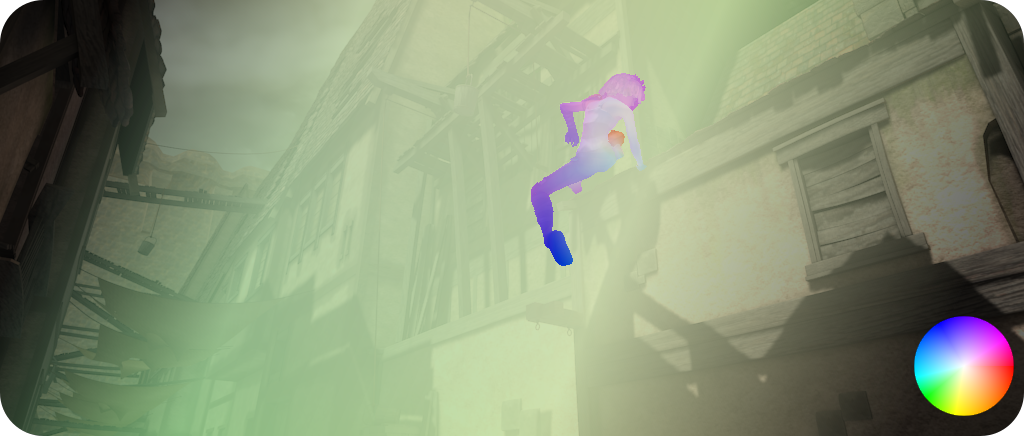
Code example to create this blended visualization can be found in the RTD tutorial section on optical flow colorization.
- channel(self: viren2d.ImageBuffer, channel: int) viren2d.ImageBuffer
Extracts a single channel.
Corresponding C++ API:
viren2d::ImageBuffer::Channel.- Parameters:
channel – The 0-based channel index as
int.- Returns:
A single-channel
ImageBufferholding a deep copy of the specified channel.
- property channels
Number of channels (read-only).
Corresponding C++ API:
viren2d::ImageBuffer::Channels.- Type:
- copy(self: viren2d.ImageBuffer) viren2d.ImageBuffer
Returns a deep copy.
The returned copy will always allocate and copy the memory, even if you call this method on a shared buffer.
Corresponding C++ API:
viren2d::ImageBuffer::DeepCopy.
- dim(self: viren2d.ImageBuffer, alpha: float) viren2d.ImageBuffer
Returns a scaled version of this image as \(\alpha * \text{self}\).
This method will not apply any sanity checks to the provided scaling factor. Since the output will have the same type, values will be implicitly cast to the data type’s range. Thus, be aware of potential value clipping if \(\alpha \notin [0, 1]\).
Corresponding C++ API:
viren2d::ImageBuffer::Dim.- Parameters:
alpha – Scaling factor as
float.
Example
>>> dimmed = img.dim(0.4)
- property dtype
Underlying data type (read-only).
Corresponding C++ API:
viren2d::ImageBuffer::BufferType.- Type:
- property height
Image height in pixels (read-only).
Corresponding C++ API:
viren2d::ImageBuffer::Height.- Type:
- is_valid(self: viren2d.ImageBuffer) bool
Returns
Trueif this buffer points to a valid memory location.Corresponding C++ API:
viren2d::ImageBuffer::IsValid.
- property itemsize
Number of bytes a single buffer element occupies (read-only).
Corresponding C++ API:
viren2d::ImageBuffer::ElementSize.- Type:
- magnitude(self: viren2d.ImageBuffer) viren2d.ImageBuffer
Computes the magnitude along the channels.
At each spatial location \((r,c)\), this method computes the magnitude along the \(C\) channels, i.e. \(M(r,c) = \sqrt{\sum_{l = [1, \dots, C]}I(r,c,l)^2}\) Can only be applied to images of type
numpy.float32ornumpy.float64, e.g. optical flow fields or image gradients.Corresponding C++ API:
viren2d::ImageBuffer::Magnitude.
- min_max(self: viren2d.ImageBuffer, channel: int = -1) tuple
Computes the min/max values and locations for the given channel.
Corresponding C++ API:
viren2d::ImageBuffer::MinMaxLocation.- Parameters:
channel – Zero-based channel index. If called on a single-channel buffer, a negative value will automatically changed to 0. Otherwise, negative values will raise an
IndexError.- Returns:
A
tuplewhich contains(min_val, max_val, min_loc, max_loc), wheremin_val&max_valare the extremal values of the selected channel asfloatandmin_loc&max_locare the \(x\) and \(y\) positions asVec2i.
- orientation(self: viren2d.ImageBuffer, invalid: float = nan) viren2d.ImageBuffer
Computes the orientation in radians as \(\operatorname{atan2}\left(I(r, c, 1), I(r, c, 0)\right)\).
Can only be applied to dual-channel images of type
numpy.float32ornumpy.float64, e.g. optical flow fields or image gradients.Corresponding C++ API:
viren2d::ImageBuffer::Orientation.- Parameters:
invalid – If both components of an input pixel are 0, the output value will be set to this user-defined invalid value.
- property owns_data
Read-only flag indicating whether this
ImageBufferowns the image data and is thus responsible for cleaning up.Corresponding C++ API:
viren2d::ImageBuffer::OwnsData.- Type:
- property pixel_stride
Stride in bytes per pixel (read-only).
Corresponding C++ API:
viren2d::ImageBuffer::PixelStride.- Type:
- pixelate(self: viren2d.ImageBuffer, block_width: int, block_height: int, left: int = -1, top: int = -1, width: int = -1, height: int = -1) None
Pixelates a rectangular region of interest in-place.
Performs in-place pixelation of images with up to 4
channels. All pixels within a block will be set to the value of the block’s center pixel.If the chosen block size does not align with the region of interest, the size of the outer blocks (left, right, top and bottom) will be increased to ensure proper pixelation of these areas.
If
left,top,widthandheightare all-1, the whole image will be pixelated.Corresponding C++ API:
viren2d::ImageBuffer::Pixelate.- Parameters:
Example
>>> img_buf.pixelate(
>>>     block_width=20, block_height=10,
>>>     left=100, top=50, width=300, height=150)
- roi(self: viren2d.ImageBuffer, left: int, top: int, width: int, height: int) viren2d.ImageBuffer
Returns an ImageBuffer which points to the given region of interest.
Allows selecting a rectangular region of interest within this
ImageBuffer. The returned buffer will always share its memory - be aware of this when performing pixel modifications on the ROI afterwards.Corresponding C++ API:
viren2d::ImageBuffer::ROI.- Parameters:
Example
>>> roi = painter.canvas.roi(left=10, top=50, width=100, height=200)
- property row_stride
Stride in bytes per row (read-only).
Corresponding C++ API:
viren2d::ImageBuffer::RowStride.- Type:
- property shape
Shape of the buffer as
(H, W, C)tuple (read-only).No corresponding C++ API, retrieve height, width and channels separately.
- Type:
- swap_channels(self: viren2d.ImageBuffer, ch1: int, ch2: int) None
Swaps the specified channels in-place.
Corresponding C++ API:
viren2d::ImageBuffer::SwapChannels.
- to_channels(self: viren2d.ImageBuffer, output_channels: int) viren2d.ImageBuffer
Returns a copy with duplicated channels or removed alpha channel.
This method can only duplicate channels or remove the alpha channel. Thus, it only supports the following use cases:
From a single channel to 1-, 3-, or 4-channel output.
From 3 channels to a 3- or 4-channel output, i.e. adding an alpha channel.
From 4 channels to a 3- or 4-channel output, i.e. removing the alpha channel.
It will not convert color images to grayscale. For this, use
convert_rgb2gray()instead.Corresponding C++ API:
viren2d::ImageBuffer::ToChannels.Important
This call will always create a deep copy, even if
selfalready has the same number of channels as requested byoutput_channels.
- to_float32(self: viren2d.ImageBuffer) viren2d.ImageBuffer
Converts this buffer to
float32.If the underlying type is integral (e.g.
numpy.uint8,numpy.int32), the values will be divided by 255. The number of channels remains the same.Corresponding C++ API:
viren2d::ImageBuffer::ToFloat.
- to_uint8(self: viren2d.ImageBuffer, output_channels: int) viren2d.ImageBuffer
Converts this buffer to
uint8.If the underlying type is
numpy.float32ornumpy.float64, the values will be multiplied by 255. Otherwise, the values will be clamped into [0, 255].Corresponding C++ API:
viren2d::ImageBuffer::ToUInt8.- Parameters:
output_channels – Number of output channels as
int. The following configurations are supported: * For a single-channel buffer:output_channelseither 1, 3, or 4. * For a 3-channel buffer:output_channelseither 3 or 4. * For a 4-channel buffer:output_channelseither 3 or 4.
Image Utilities
- viren2d.collage(images: object, size: viren2d.Vec2i = viren2d.Vec2i(-1, -1), anchor: viren2d.Anchor = viren2d.Anchor('top-left'), fill_color: viren2d.Color = viren2d.Color(red=1, green=1, blue=1, alpha=1), channels: int = 3, spacing: viren2d.Vec2i = viren2d.Vec2i(0, 0), margin: viren2d.Vec2i = viren2d.Vec2i(0, 0), clip_factor: float = 0.0) viren2d.ImageBuffer
Creates a collage.
Positions the given images in a grid and renders them onto an output
ImageBuffer. The jagged input parameterimagesdefines their arrangement, for example:>>> images = [[img1, img2]] Results in 1 row, 2 columns.
>>> images = [[img1], [img2]]
Results in 2 rows, 1 column.
>>> images = [[img1, img2, img3], [None, img4], [None, None, img5]]
Results in 3 rows, 3 columns:
' img1  img2  img3 '
'       img4       '
'             img5 '
The maximum size of all images in a row/column define the corresponding height/width. Optionally, the row/column size can be constrained by specifying a fixed
sizefor each image, by either providing both, height and width, or only one fixed dimension. In the latter case, the other image dimension will be adjusted according to its aspect ratio. For example:>>> size = (-1, -1) Each image will be rendered at the original resolution.
>>> size = (200, -1)
Each image will be 200 pixels wide.
>>> size = (-1, 400)
Each image will be 400 pixels tall.
Warning
TODO Runtime measurements are still missing. Scaling should be the bottleneck, conversion to uint8c4 will also contribute slightly.
Example
>>> vis = viren2d.collage(
>>>     [[img1, img2, img3], [None, img4], [img5]],
>>>     size=(-1, -1), anchor='center', fill_color='white',
>>>     channels=3, spacing=(5, 5), margin=(0, 0), clip_factor=0.0)
- Parameters:
images – A jagged
list(ortuple) of input images. Each image can either be anImageBuffer, anumpy.ndarray, orNone(to skip a cell). Images will be converted tonumpy.uint8before rendering. For this, images of typenumpy.float32andnumpy.float64will be multiplied by 255, whereas all other types are currently just cast/truncated.size – Optional fixed size of each image.
anchor – Placement of each image within its corresponding cell.
fill_color – Background color. Must be a valid
Color.channels – Number of output channels, must be either 3 or 4.
spacing – Distance between neighboring columns and rows as
viren2d.Vec2i.margin – Distance between the collage boundary and the first/last row and column as
viren2d.Vec2i.clip_factor – If greater than 0, the corners of each image will be clipped. In particular, \(0 < \text{clip} \leq 0.5\) will result in a rounded rectangle, where the corner radius will be
clip_factortimes \(\min(\text{width}, \text{height})\). If \(\text{clip} > 0.5\), the clip region will be an ellipse, where major/minor axis length equal the width/height of the image.
- Returns:
A 3- or 4-channel
ImageBuffer. If there was an error, the output will be invalid (check viais_valid()) and a corresponding error message will be logged.
- viren2d.color_pop(image: viren2d.ImageBuffer, hue_range: Tuple[float, float], saturation_range: Tuple[float, float] = (0.0, 1.0), value_range: Tuple[float, float] = (0.0, 1.0), is_bgr: bool = False) viren2d.ImageBuffer
Returns an image where the specified color range is highlighted.
Implements a color pop effect, i.e. colors within the given HSV range remain as-is, whereas all other colors are converted to grayscale.
Corresponding C++ API:
viren2d::ColorPop.- Parameters:
image – Color image in RGB(A)/BGR(A) format.
hue_range – Hue range as
tuple(min_hue, max_hue), where hue values are of typefloat\(\in [0, 360]\).saturation_range – Saturation range as
tuple(min_saturation, max_saturation), where saturation values are of typefloat\(\in [0, 1]\).value_range – Value range as
tuple(min_value, max_value), where each value is of typefloat\(\in [0, 1]\).is_bgr – Set to
Trueif the color image is provided in BGR(A) format.
- Returns:
An
ImageBufferof typenumpy.uint8, which has the same format and number of channels as the inputrgb.
Example
>>> red_pop = viren2d.color_pop(
>>>     image=img, hue_range=(320, 360), saturation_range=(0.4, 1),
>>>     value_range=(0.2, 1), is_bgr=False)
Color Space Conversions
- viren2d.convert_gray2rgb(grayscale: viren2d.ImageBuffer, output_channels: int = 3) viren2d.ImageBuffer
Converts a grayscale image to RGB(A).
Corresponding C++ API:
viren2d::ImageBuffer::ToChannels.- Parameters:
grayscale – An
ImageBufferwhich can have 1, 3 or 4 channels (assuming that the first 3 channels simply repeat the luminance and the 4th holds the alpha values).output_channels – Number of output channels. Must be 3 (for RGB) or 4 (for RGBA).
- viren2d.convert_hsv2rgb(hsv: viren2d.ImageBuffer, output_channels: int = 3, output_bgr: bool = False) viren2d.ImageBuffer
Converts a HSV image to RGB(A)/BGR(A).
Corresponding C++ API:
viren2d::ConvertHSV2RGB.- Parameters:
hsv – The 3-channel HSV
ImageBufferof typenumpy.uint8, where hue \(\in [0, 180]\), saturation \(\in [0, 255]\) and value \(\in [0, 255]\).output_channels – The number of output channels, which must be 3 or 4. The optional fourth channel will be set to 255 (fully-opaque).
output_bgr – If
True, the result will be in BGR(A) format.
- viren2d.convert_rgb2gray(color: viren2d.ImageBuffer, output_channels: int = 1, is_bgr: bool = False) viren2d.ImageBuffer
Converts RGB(A)/BGR(A) images to grayscale.
Corresponding C++ API:
viren2d::ConvertRGB2Gray.- Parameters:
color – The 3- or 4-channel color
ImageBufferof typenumpy.uint8.output_channels – Number of output channels as
int. Must be 1, 3, or 4. The first three channels will contain the repeated luminance, whereas the 4th channel will be the alpha channel and either fully opaque or a copy of this image’s alpha channel.is_bgr – Set to
Trueif the channels of the color image are in BGR format.
- viren2d.convert_rgb2hsv(image: viren2d.ImageBuffer, is_bgr: bool = False) viren2d.ImageBuffer
Converts a RGB(A)/BGR(A) image to HSV.
Corresponding C++ API:
viren2d::ConvertRGB2HSV.- Parameters:
image – The 3- or 4-channel color
ImageBufferof typenumpy.uint8.is_bgr – Set to
Trueif the channels of the color image are in BGR format.
- Returns:
A 3-channel
ImageBufferholding hue, saturation and value, with hue \(\in [0, 180]\), saturation \(\in [0, 255]\) and value \(\in [0, 255]\).
Image I/O
The image I/O functions are quite limited in comparison to specialized image processing libraries, i.e. only loading/saving 8-bit images is supported.
- viren2d.load_image_uint8(filename: object, force_channels: int = 0) viren2d.ImageBuffer
Reads an 8-bit image from disk.
This functionality uses the stb library to load the image file. Supported formats are:
JPEG, PNG, TGA, BMP, PSD, GIF, HDR, PIC, PNM
Corresponding C++ API:
viren2d::LoadImageUInt8.- Parameters:
filename – The path to the image file as
strorpathlib.Path.force_channels –
An
intwhich is used to force the number of loaded channels, e.g. to load a JPEG into RGBA format withforce_channels = 4.Valid parameter settings are:
0: Load image as-is.1: Load image as grayscale.2: Load image as grayscale + alpha channel.3: Load image as RGB.4: Load image as RGBA.
- viren2d.save_image_uint8(filename: object, image: viren2d.ImageBuffer) None
Stores an 8-bit image to disk as either JPEG or PNG.
Important
The PNG output will usually result in 20-50% larger files in comparison to optimized PNG libraries. Thus, this option should only be used if you don’t already work with a specialized image processing library that offers optimized image I/O.
Corresponding C++ API:
viren2d::SaveImageUInt8.- Parameters:
filename – The output filename as
strorpathlib.Path. The calling code must ensure that the directory hierarchy exists.image – The
ImageBufferwhich should be written to disk.