Label Colorization
Label images, such as the results of semantic, panoptic or instance
segmentation, should not be scale colorized as this would result
in numerically nearby labels being assigned to the same color. Instead,
use colorize_labels() which will properly alternate between
the colors of the chosen color map:
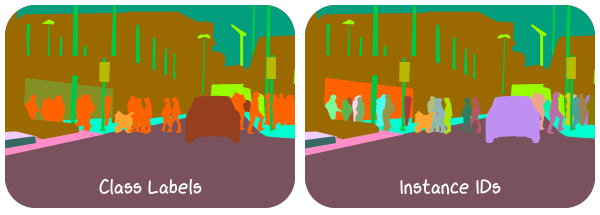
This visualization shows class- and instance-level annotations from a crop of the Cityscapes (Zurich) training dataset. Corresponding colorization code:
 1class_labels = viren2d.load_image_uint8(
 2    VIREN2D_DATA_PATH / 'semseg-classes.png')
 3# Instance labels are stored as 16-bit PNG, loading this properly
 4# requires Pillow or any other external library:
 5instance_labels = np.array(
 6    Image.open(str(VIREN2D_DATA_PATH / 'semseg-instances.png')))
 7
 8text_style = viren2d.TextStyle(
 9    family='xkcd', size=21, color='white')
10
11painter = viren2d.Painter(height=215, width=600, color='white!0')
12
13vis_cls = viren2d.colorize_labels(
14    labels=class_labels, colormap='glasbey-light')
15
16scale = (painter.canvas.width / 2 - 10) / vis_cls.width
17
18painter.draw_image(
19    vis_cls, position=(5, 5), anchor='top-left', scale_x=scale,
20    scale_y=scale, clip_factor=0.15)
21
22painter.draw_text(
23    text=['Class Labels'],
24    position=(0.25 * painter.canvas.width, painter.canvas.height - 15),
25    anchor='bottom', text_style=text_style)
26
27vis_ids = viren2d.colorize_labels(
28    labels=instance_labels, colormap='glasbey-light')
29
30painter.draw_image(
31    image=vis_ids, position=(painter.canvas.width - 5, 5),
32    anchor='top-right', scale_x=scale, scale_y=scale, clip_factor=0.15)
33
34painter.draw_text(
35    text=['Instance IDs'],
36    position=(0.75 * painter.canvas.width, painter.canvas.height - 15),
37    anchor='bottom', text_style=text_style)