Optical Flow
Refer to the optical flow visualization tutorial for exemplary code and visualizations.
Colorizes a two-band optical flow field. |
|
Loads an optical flow field from a |
|
Returns the color wheel visualization. |
|
Saves a two-band optical flow field as |
Colorization
- viren2d.colorize_optical_flow(flow: viren2d.ImageBuffer, colormap: viren2d.ColorMap = viren2d.ColorMap('orientation6'), motion_normalizer: float = 1.0, output_channels: int = 3) viren2d.ImageBuffer
Colorizes a two-band optical flow field.
Given a cyclic color map, this returns the false color representation, where the flow orientation defines the color map bin and the magnitude defines the corresponding color’s saturation. The default color map is the cyclic six-color map CET-C6 proposed by Peter Kovesi.
This assumes that flow is normalized such that the maximum magnitude is 1. Larger motion will be indicated by a desaturated color. To avoid this, you can adjust the
motion_normalizerparameter.Corresponding C++ API:
viren2d::ColorizeOpticalFlow.- Parameters:
flow – The optical flow field as 2-channel
ImageBuffer, where the first and second channels hold the motion in \(x\) and \(y\) direction, respectively. Must be of typenumpy.float32ornumpy.float64.colormap – The
ColorMapto be used for colorization. In addition to the enumeration value, the corresponding string representation can be used for convenience.motion_normalizer – A
floatparameter used to divide the flow magnitude. Set to the maximum motion magnitude to avoid desaturation in regions where the flow magnitude would be \(> 1\).output_channels – Number of output channels. Must be either 3 or 4. If a fourth channel is requested, it is considered an alpha channel and set to 255.
- Returns:
A 3- or 4-channel
ImageBufferof typenumpy.uint8.
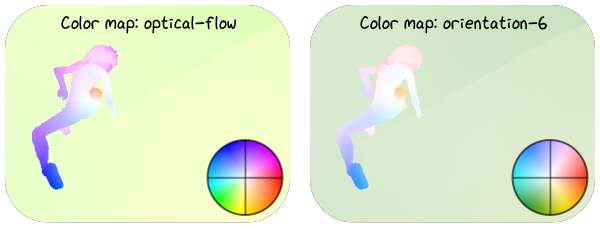
For examples and code listings, refer to the RTD tutorial section on optical flow colorization.
- viren2d.optical_flow_legend(size: int, colormap: viren2d.ColorMap = viren2d.ColorMap('orientation6'), line_style: viren2d.LineStyle = <LineStyle::Invalid>, draw_circle: bool = False, clip_circle: bool = False, output_channels: int = 3) viren2d.ImageBuffer
Returns the color wheel visualization.
Corresponding C++ API:
viren2d::OpticalFlowLegend.- Parameters:
size – The output image will be
sizebysizepixels.colormap – The
ColorMapto be used for colorization. In addition to the enumeration value, the corresponding string representation can be used for convenience.line_style – A
LineStylespecifying how to draw the grid overlay on the legend. Disable grid overlay by passingLineStyle.Invalid.draw_circle – If the grid is overlaid (see
line_style), you can overlay a circle by setting this flag toTrue).clip_circle – If
output_channelsis 4 and this flag isTrue, the color wheel legend will be clipped by a circle within the alpha channel.output_channels – Number of output channels, must be either 3 or 4. If a fourth channel is requested, it is considered an alpha channel. Alpha values depend on the value of
clip_circle.
- Returns:
A 3- or 4-channel
ImageBufferof typenumpy.uint8.
Optical Flow I/O
- viren2d.load_optical_flow(filename: object) viren2d.ImageBuffer
Loads an optical flow field from a
.flofile.Corresponding C++ API:
viren2d::LoadOpticalFlow.- Parameters:
filename – The path to the
.flofile asstrorpathlib.Path.- Returns:
A 2-channel
ImageBufferof typenumpy.float32.
- viren2d.save_optical_flow(filename: object, flow: viren2d.ImageBuffer) None
Saves a two-band optical flow field as
.flofile.Corresponding C++ API:
viren2d::SaveOpticalFlow.- Parameters:
filename – The output filename as
strorpathlib.Path. The calling code must ensure that the directory hierarchy exists.flow – The optical flow data as 2-channel
ImageBufferwhich should be written to disk. Must be of typenumpy.float32ornumpy.float64.