Positioning
Placement options with respect to a reference point. |
|
Enumeration for horizontal alignment. |
|
Options for vertical alignment. |
|
Placement options for labels. |
Anchor
- class viren2d.Anchor
Placement options with respect to a reference point.
- Explicit instantiation:
>>> anchor = viren2d.Anchor.TopLeft
- Implicit conversion:
>>> painter.draw_text(..., anchor='center')
All supported anchors are shown below and can also be listed via
list_all().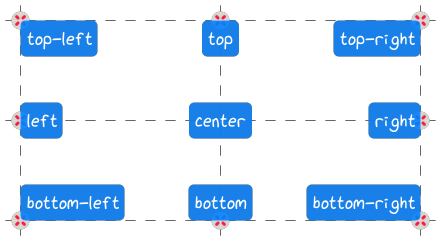
Corresponding C++ API:
viren2d::Anchor.Members:
- Center :
Horizontally & vertically centered. Alias string representation:
'middle'.- Left :
Horizontally left-aligned & vertically centered. Alias string representation:
west.- Right :
Horizontally right-aligned & vertically centered. Alias string representation:
east.- Top :
Horizontally centered & vertically top-aligned. Alias string representation:
north.- Bottom :
Horizontally centered & vertically bottom-aligned. Alias string representation:
south.- TopLeft :
Horizontally left- & vertically top-aligned. Alias string representation:
north-west.- TopRight :
Horizontally right- & vertically top-aligned. Alias string representation:
north-east.- BottomLeft :
Horizontally left- & vertically bottom-aligned. Alias string representation:
south-west.- BottomRight :
Horizontally right- & vertically bottom-aligned. Alias string representation:
south-east.
- static list_all() List[viren2d.Anchor]
Returns all
Anchorvalues.Convenience utility to easily iterate all enumeration values.
Corresponding C++ API:
viren2d::ListAnchors.
Horizontal Alignment
- class viren2d.HorizontalAlignment
Enumeration for horizontal alignment.
Corresponding C++ API:
viren2d::HorizontalAlignment.Members:
- Left :
Horizontally left-aligned.
String representation
'left'or'west'.- Center :
Horizontally centered.
String representation
'center'or'middle'.- Right :
Horizontally right-aligned.
String representation
'right'or'east'.
Exemplary alignment of mulit-line text:
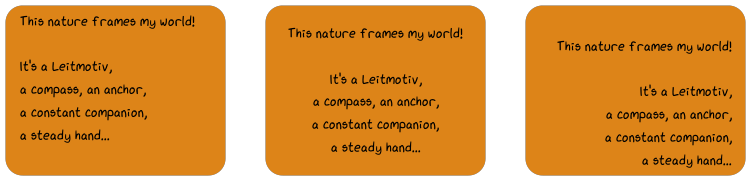
The code listing to create this visualization is shown in the tutorial section on multi-line text.
Vertical Alignment
- class viren2d.VerticalAlignment
Options for vertical alignment.
Corresponding C++ API:
viren2d::VerticalAlignment.Members:
- Top :
Vertically top-aligned.
String representation
'top'or'north'.- Center :
Vertically centered.
String representation
'center'or'middle'.- Bottom :
Vertically bottom-aligned.
String representation
'bottom'or'south'.
Label Position
- class viren2d.LabelPosition
Placement options for labels.
Corresponding C++ API:
viren2d::LabelPosition.Members:
- Top :
At the top of the bounding box.
- Bottom :
At the bottom of the bounding box.
- Left :
Along the left edge of the bounding box, from bottom to top. Alias string representation:
left-b2t.- LeftT2B :
Along the left edge of the bounding box, from top to bottom.
- Right :
Along the right edge of the bounding box, from top to bottom. Alias string representation:
right-t2b.- RightB2T :
Along the right edge of the bounding box, from bottom to top.
Example:
TODO add example bbox image and refer to tutorial section on tracking-by-detection
Corresponding Python Code:
TODO implement in examples/rtd/positioning