Markers & Keypoints
Highlight locations via draw_marker() or
draw_markers().
Marker Shape Cheat Sheet:
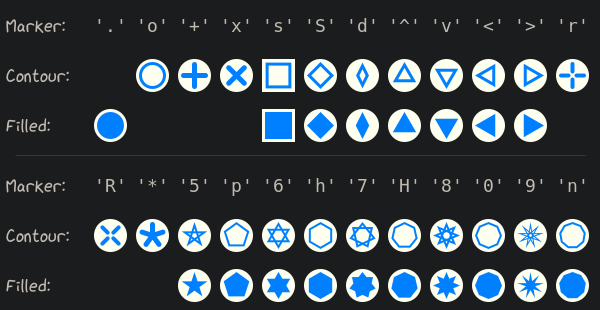
This visualization has been created with the following Python code:
 1text_style = viren2d.TextStyle(color=viren2d.RGBa(192, 186, 177))
 2marker_style = viren2d.MarkerStyle(
 3    size=27, thickness=2, cap='round', color='azure',
 4    bg_color='ivory', bg_border=3)
 5
 6def _prepare_display_row(y1, y2, y3):
 7    text_style.family = 'xkcd'
 8    text_style.size = 18
 9
10    painter.draw_text(
11        ['Marker:'], (5, y1), 'left', text_style)
12    painter.draw_text(
13        ['Contour:'], (5, y2), 'left', text_style)
14    painter.draw_text(
15        ['Filled:'], (5, y3), 'left', text_style)
16
17    # Adjust text style for the marker code outputs:
18    text_style.family = 'monospace'
19    text_style.size = 18
20
21    # Draw a delimiter below this row
22    painter.draw_line(
23        (15, y3 + 30), (585, y3 + 30),
24        viren2d.LineStyle(width=1, color=(0.3, 0.3, 0.3, 0.6)))
25
26def _thickness(marker):
27    # Due to the fixed marker size, we should adjust the line thickness for
28    # a neater visualization.
29    mc = str(marker)[1]
30    if mc == '9':
31        return 1
32    elif mc in ['+', 'x', '*']:
33        return 5
34    elif mc in ['r', 'R']:
35        return 4
36    elif mc in ['o', 's', 'S', 'd', '^', 'v', '<', '>']:
37        return 3
38    else:
39        return 2
40
41# Iterate and visualize the available markers:
42y1, y2, y3 = 25, 75, 125
43left = 110
44_prepare_display_row(y1, y2, y3)
45x = left
46for marker in viren2d.Marker.list_all():
47    # Put the marker's char code on top:
48    painter.draw_text([str(marker)], (x, y1), 'center', text_style)
49
50    # Draw the marker's outline (if its shape allows):
51    marker_style.marker = marker
52    marker_style.thickness = _thickness(marker)
53    marker_style.filled = False
54    if not marker_style.is_filled():
55        painter.draw_marker((x, y2), marker_style)
56
57    # Draw the filled marker (if its shape allows):
58    marker_style.filled = True
59    if marker_style.is_filled():
60        painter.draw_marker((x, y3), marker_style)
61
62    x += 42
63    if x >= 580:  # Start the 2nd row
64        x = left
65        y1 += 160
66        y2 += 160