Basic Shapes
This tutorial section shows some selected shapes & primitives with their
corresponding code examples. For a detailed listing of supported shapes, refer
to the Painter’s API documentation.
Arrows
Arrow shapes can easily be customized:
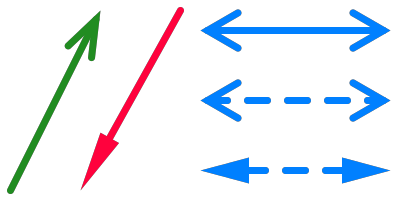
 1# Style specification:
 2arrow_style = viren2d.ArrowStyle(
 3    width=7, color='forest-green', cap=viren2d.LineCap.Round)
 4
 5painter.draw_arrow((10, 190), (100, 10), arrow_style)
 6
 7arrow_style.color = 'rose-red'
 8arrow_style.tip_closed = True
 9arrow_style.tip_angle = 10
10painter.draw_arrow(pt2=(80, 190), pt1=(180, 10), arrow_style=arrow_style)
11
12arrow_style.color = 'azure'
13arrow_style.tip_closed = False
14arrow_style.tip_angle = 30
15arrow_style.double_headed = True
16painter.draw_arrow((200, 30), (390, 30), arrow_style)
17
18arrow_style.dash_pattern = [20, 20]
19painter.draw_arrow((200, 100), (390, 100), arrow_style)
20
21arrow_style.tip_angle = 15
22arrow_style.tip_closed = True
23painter.draw_arrow((200, 170), (390, 170), arrow_style)
Circles & Lines
The following example shows basic line & circle drawings:
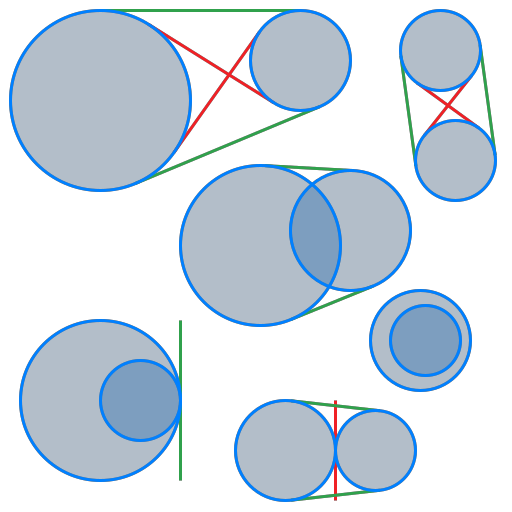
This example is C++ only, because viren2d focuses on visualization and
thus, does not provide Python bindings for the tangent computation. This
geometric functionality is available in C++ via the
werkzeugkiste::geometry library:
 1/// Draws the two circles and their tangents.
 2void TangentsDemoHelper(
 3    std::unique_ptr<Painter> &painter,
 4    const wkg::Circle &circ1,
 5    const wkg::Circle &circ2) {
 6  LineStyle tangent_style(3, Color::CoordinateAxisColor('x'));
 7  LineStyle circle_style(3, "azure");
 8
 9  // Draw the transverse common tangents:
10  wkg::Line2d t1, t2;
11  const int num_transverse = circ1.TransverseCommonTangents(circ2, &t1, &t2);
12
13  std::vector<wkg::Line2d> transverse_tangents;
14  if (num_transverse > 0) {
15    transverse_tangents.push_back(t1);
16  }
17  if (num_transverse > 1) {
18    transverse_tangents.push_back(t2);
19  }
20  for (const auto &tangent : transverse_tangents) {
21    painter->DrawLine(tangent.From(), tangent.To(), tangent_style);
22  }
23
24  // Draw the direct common tangents:
25  wkg::Line2d d1, d2;
26  const int num_direct = circ1.DirectCommonTangents(circ2, &d1, &d2);
27
28  std::vector<wkg::Line2d> direct_tangents;
29  if (num_direct > 0) {
30    direct_tangents.push_back(d1);
31  }
32  if (num_direct > 1) {
33    direct_tangents.push_back(d2);
34  }
35
36  tangent_style.color = Color::CoordinateAxisColor('y');
37  for (const auto &tan : direct_tangents) {
38    painter->DrawLine(tan.From(), tan.To(), tangent_style);
39  }
40
41  // Draw the circles
42  painter->DrawCircle(
43        circ1.Center(), circ1.Radius(),
44        circle_style, Color::Same.WithAlpha(0.3));
45  painter->DrawCircle(
46        circ2.Center(), circ2.Radius(),
47        circle_style, Color::Same.WithAlpha(0.3));
48}
49
50
51void DemoCircleTangents() {
52  PrintDemoHeader("Circle Tangents");
53
54  auto painter = CreatePainter();
55  painter->SetCanvas(512, 512, Color::White.WithAlpha(0.0));
56
57  // Two separate circles, with all four tangents
58  wkg::Circle circle1{{100.0, 100.0}, 90.0};
59  wkg::Circle circle2{{300.0,  60.0}, 50.0};
60  TangentsDemoHelper(painter, circle1, circle2);
61
62  // Same radii
63  circle1 = {{440.0,  50.0}, 40.0};
64  circle2 = {{455.0, 160.0}, 40.0};
65  TangentsDemoHelper(painter, circle1, circle2);
66
67  // Intersecting (outside), different radii
68  circle1 = {{285.0, 450.0}, 50.0};
69  circle2 = {{375.0, 450.0}, 40.0};
70  TangentsDemoHelper(painter, circle1, circle2);
71
72  // Overlapping
73  circle1 = {{260.0, 245.0}, 80.0};
74  circle2 = {{350.0, 230.0}, 60.0};
75  TangentsDemoHelper(painter, circle1, circle2);
76
77  // Intersecting (inner)
78  circle1 = {{100.0, 400.0}, 80.0};
79  circle2 = {{140.0, 400.0}, 40.0};
80  TangentsDemoHelper(painter, circle1, circle2);
81
82  // Inside (no tangent)
83  circle1 = {{425.0, 340.0}, 35.0};
84  circle2 = {{420.0, 340.0}, 50.0};
85  TangentsDemoHelper(painter, circle1, circle2);
86
87  ProcessDemoOutput(painter->GetCanvas(false), "circle-tangents.png");
88  painter.reset();
89}
Ellipses
Both ellipses and elliptical arcs are supported:
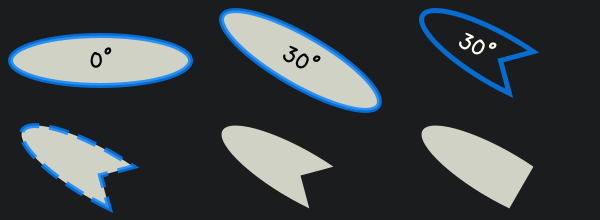
 1# Style specifications:
 2text_style = viren2d.TextStyle(
 3    family='xkcd', size=23, line_spacing=0.8, halign='center')
 4
 5line_style = viren2d.LineStyle(width=5, color='azure!80')
 6
 7fill_color = 'ivory!80'
 8
 9# Top-left ellipse:
10ellipse = viren2d.Ellipse(
11    center=(100, 60), axes=(180, 50), rotation=0)
12painter.draw_ellipse(ellipse, line_style, fill_color)
13
14painter.draw_text(['0°'], ellipse.center, 'center', text_style)
15
16# Top ellipse:
17ellipse.cx = 300
18ellipse.rotation = 30
19painter.draw_ellipse(ellipse, line_style, fill_color)
20
21painter.draw_text(
22    ['30°'], ellipse.center, 'center', text_style,
23    rotation=ellipse.rotation)
24
25# Top-right ellipse:
26ellipse.cx = 500
27ellipse.angle_from = 45
28ellipse.angle_to = 315
29painter.draw_ellipse(ellipse, line_style)
30
31text_style.color = 'ivory'
32painter.draw_text(
33    ['30°'], ellipse.center, 'right', text_style,
34    padding=(10, 0), rotation=ellipse.rotation)
35
36# Bottom-left ellipse:
37line_style.dash_pattern = [20, 10]
38ellipse.center = (100, 175)
39painter.draw_ellipse(ellipse, line_style, fill_color)
40
41# Bottom ellipse:
42ellipse.cx = 300
43painter.draw_ellipse(ellipse, viren2d.LineStyle.Invalid, fill_color)
44
45# Bottom-right ellipse:
46ellipse.include_center = False
47ellipse.cx = 500
48painter.draw_ellipse(ellipse, viren2d.LineStyle.Invalid, fill_color)
Rectangles
Rectangles can be drawn in a variety of configurations:
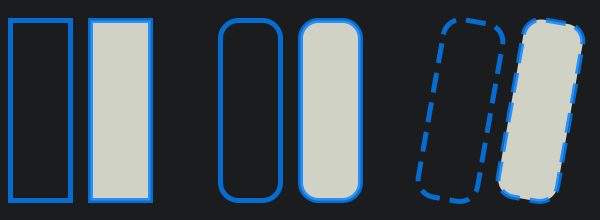
 1# Style specification:
 2line_style = viren2d.LineStyle(width=5, color='azure!80')
 3fill_color = 'ivory!80'
 4
 5# Square rectangles (left):
 6rect = viren2d.Rect(center=(40, 110), size=(60, 180))
 7painter.draw_rect(rect, line_style)
 8
 9rect.cx += 80
10painter.draw_rect(rect, line_style, fill_color)
11
12# Rounded rectangles (center):
13rect.cx = 250
14rect.radius = 0.3
15painter.draw_rect(rect, line_style)
16
17rect.cx += 80
18painter.draw_rect(rect, line_style, fill_color)
19
20# Dashed & rotated rectangles (right):
21line_style.dash_pattern = [20, 10]
22rect.cx = 460
23rect.rotation = 10
24painter.draw_rect(rect, line_style)
25
26rect.cx += 80
27painter.draw_rect(rect, line_style, fill_color)